🎉 Start Shopify’s $1 Plan and We’ll pay you up to $3,600 just for starting! 💸 — Limited Time
Get Limited Time Offer 💰
Offer Details — Rewards require completing eligible third-party offers. Reward amounts vary from $30 to $3,600. Terms and eligibility restrictions apply.
🎉 Start Shopify’s $1 Plan and We’ll pay you up to $3,600 just for starting! 💸 — Limited Time
Get Limited Time Offer 💰
Offer Details — Rewards require completing eligible third-party offers. Reward amounts vary from $30 to $3,600. Terms and eligibility restrictions apply.
🎉 Start Shopify’s $1 Plan and We’ll pay you up to $3,600 just for starting! 💸 — Limited Time
Get Limited Time Offer 💰
Offer Details — Rewards require completing eligible third-party offers. Reward amounts vary from $30 to $3,600. Terms and eligibility restrictions apply.
Ecommerce Strategies
Ultimate Guide to Social Media Automation for Shopify
Ultimate Guide to Social Media Automation for Shopify

Social media automation is a game-changer for Shopify businesses, especially dropshipping stores. It saves time, ensures consistent activity across platforms, and helps you focus on scaling your store. Here's what you need to know:
What It Does: Automates repetitive tasks like post scheduling, syncing product catalogs, and responding to customer inquiries.
Why It’s Important: With U.S. social commerce sales expected to hit $80 billion in 2025, automation helps you stay active across multiple platforms while saving over 300 hours annually.
Key Tools: Apps like Outfy, Post Studio, and Nuelink can auto-post products, create AI-generated content, and sync Shopify updates with social platforms.
Results: Automation boosts engagement, click-through rates, and sales. For example, AI-powered social posts can increase carousel engagement by 150% and click-through rates by 25%.
How to Automatically Post Shopify Products on Social Media: Instagram, Pinterest, Facebook, & Others
Setting Up Automated Social Media Marketing for Shopify
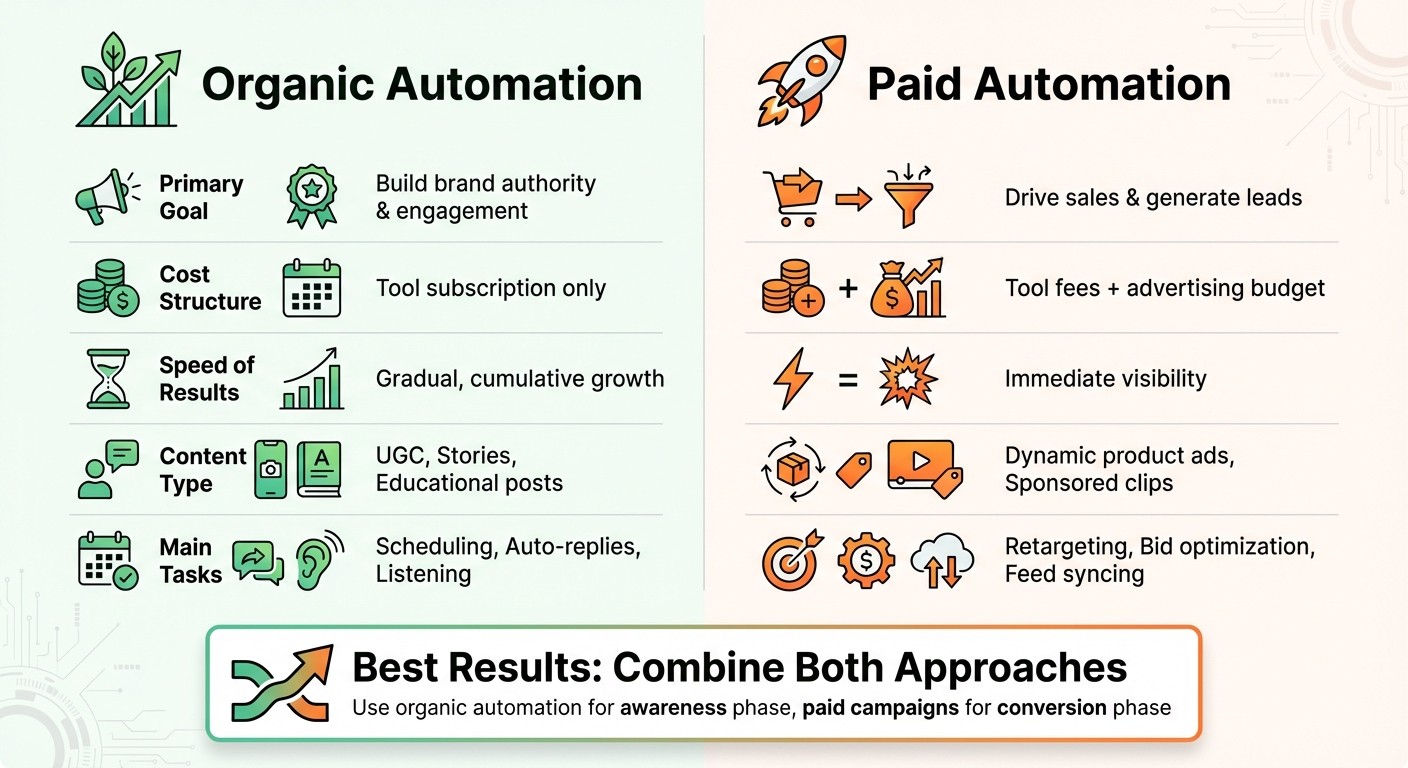
Organic vs Paid Social Media Automation for Shopify Stores
Before diving into automation, it’s crucial to have a solid foundation. Without proper preparation, automated campaigns can feel disjointed, delivering inconsistent results instead of driving sales. Additionally, it’s important to distinguish between organic and paid strategies to allocate your resources wisely.
Organic vs. Paid Social Media Automation
Organic automation focuses on tasks like scheduling posts, generating AI-powered captions, responding to common queries with chatbots, and tracking brand mentions across platforms. This approach is all about building long-term relationships, nurturing your audience, and establishing brand authority - all without direct ad spend, aside from the cost of tools.
Paid automation, on the other hand, requires both tool subscriptions and an advertising budget. It’s designed for immediate impact, powering features like dynamic product ads synced with your Shopify catalog, retargeting visitors who abandoned their carts, and optimizing bids to maximize ROI. While organic efforts foster trust and maintain a consistent presence, paid strategies drive quick visibility and conversions by targeting new audiences.
Many Shopify merchants find success by combining both approaches. For instance, organic automation keeps your social media feed active and engages your community, while paid automation amplifies high-performing content and zeroes in on specific buyer personas. A practical example? Use organic automation to share educational posts during the awareness phase and pivot to paid campaigns, like flash sale retargeting, when potential customers are ready to make a purchase.
Feature | Organic Automation | Paid Automation |
|---|---|---|
Primary Goal | Build brand authority & engagement | Drive sales & generate leads |
Cost Structure | Tool subscription only | Tool fees + advertising budget |
Speed of Results | Gradual, cumulative growth | Immediate visibility |
Content Type | UGC, Stories, Educational posts | Dynamic product ads, Sponsored clips |
Main Tasks | Scheduling, Auto-replies, Listening | Retargeting, Bid optimization, Feed syncing |
Requirements Before Starting Automation
To ensure a smooth start, there are a few key steps to take:
Define your brand personality: Choose a brand archetype, such as "The Hero" or "The Rebel", and outline core traits. This helps ensure automated messages stay consistent with your voice.
Optimize your product catalog: Use high-quality images, detailed descriptions, and accurate pricing. Automation tools rely on this data to create effective campaigns.
Set up tracking tools: Install Meta Pixels on your Shopify store and use UTM parameters on social links to track campaign performance. Without tracking, you won’t know which campaigns are driving revenue.
Enable shopping features: Link Instagram Shopping and Facebook Shops to your Shopify catalog. This allows automated posts to include instant checkout options.
Once these elements are in place, you’ll be ready to launch automation strategies with confidence.
Preparing Your Shopify Store for Automation
For those looking to streamline the setup process, an AI-built store from BuildMyStores can be a game-changer. These stores come with AI-optimized themes designed to convert traffic from social platforms and include pre-configured product catalogs that integrate seamlessly with automation tools. This eliminates the need to manually format countless product listings.
An added benefit? You retain 100% ownership with no revenue-sharing, giving you complete control over your automation strategies. The store’s structure is specifically designed to support the automation methods discussed earlier, allowing you to focus on building workflows instead of fixing foundational issues. This is especially valuable for dropshipping businesses aiming to launch quickly and scale across multiple social platforms.
Main Automation Workflows for Shopify Social Media
Streamline your Shopify social media strategy with automation workflows that save time and keep your presence consistent. Focus on three key areas: product posting, promotional campaigns, and AI-generated content. These workflows take care of repetitive tasks, freeing you up to focus on growing your business.
Auto-Posting Products and Collections
Since Shopify doesn’t have built-in social media auto-posting, third-party apps like Post Studio, Outfy, or Robopost can bridge the gap. These tools pull product data, images, and pricing directly from your Shopify catalog and post them on platforms like Instagram, Facebook, Pinterest, and TikTok.
You can also use Smart Filtering to target specific collections instead of spamming your feed with every item in your store. For instance, you might choose to post only items tagged as “t-shirts” or products from your "Spring Collection." This approach ensures your content stays relevant and aligns with your marketing goals. Tools like Robopost let you either schedule posts for peak engagement times or trigger them instantly.
AI-powered apps take things a step further by generating captions, hashtags, and even video content directly from your product descriptions. Outfy, for example, has a 4.6/5-star rating from over 1,300 reviews on the Shopify App Store and specializes in turning static product images into dynamic Reels, TikToks, and collages. This matters because photos and short videos are shared 40 times more often than text-only posts.
Tool | Free Tier | Paid Tier Starts At | Key Features |
|---|---|---|---|
Post Studio | Yes | $9.99/month | Simple auto-posting to Facebook, Instagram, Pinterest, Twitter |
Outfy | Yes | $15.00/month | AI-powered videos, Reels, and collages |
Yes | $35.00/month | Automated social videos and banners | |
Yes | $9.99/month | Template-based multi-platform posting |
These tools form the foundation for building more dynamic and time-sensitive campaigns.
Automating Promotional Campaigns
Automation isn’t just about posting products - it’s also about timing your campaigns to match sales events, flash deals, and seasonal launches. A content calendar with time-based triggers allows you to plan posts in advance. This batch-creation method can save brands over 6 hours per week, adding up to more than 300 hours annually.
Another valuable feature is dynamic pricing updates. When you adjust prices for a flash sale or seasonal promotion, automation tools can sync the changes with your social posts in real time, ensuring your audience always sees the correct information. Additionally, abandoned cart reminders can be automated to send Instagram DMs or Facebook Messenger notifications when customers leave items in their carts.
For example, you could use these tools to schedule a month’s worth of Black Friday posts in one sitting. Automation ensures posts adjust based on inventory levels and maintain consistent timing and messaging, allowing you to focus on other business priorities.
Using AI for Social Content
Take your automation workflows to the next level by using AI to personalize and optimize your social media content.
AI tools analyze product information to create tailored captions, hashtags, and visuals for each platform. For example, AI can craft a 138–150-character caption optimized for Instagram and adapt the same product into an under-80-character post for Facebook.
Visual content automation is another game-changer. Apps like Outfy and Minta can transform product photos into videos, carousels, and collages - no design skills required. Outfy even supports multiple languages, including English, Spanish, French, German, and Italian, making it easier to connect with international audiences. With a 4.8/5-star rating from 432 reviews, users highlight its ability to save hours of manual work by automating tasks like creating product collages.
"The real power of AI comes from understanding how to guide it strategically, providing the right context and direction so it becomes an extension of your marketing brain rather than a replacement for it." - Bizzuka
To get the most out of AI-generated content, provide detailed prompts that outline your target audience, brand personality, and campaign objectives. For better results, request 3–5 variations of the same post to test which version resonates most. AI-driven social media automation can boost click-through rates by up to 47%.
Best Tools for Shopify Social Media Automation
Recommended Shopify Automation Tools
If you're running a Shopify dropshipping store, Outfy is a standout tool to consider. With an impressive 4.8/5-star rating from 1,214 reviews on the Shopify App Store, it turns your product images into engaging Reels, TikToks, and YouTube Shorts. Plus, it integrates with review apps like JudgeMe and Fera, transforming customer feedback into branded social media posts.
"Outfy produces amazing Marketing for social media - better than an expensive marketing agency and does it automatically at a very reasonable cost".
Nuelink is another powerful option. It connects your Shopify collections directly to your social media accounts, filtering out unavailable items using keywords like "sold out" or "backorder." It checks your store at regular intervals and posts new products with AI-generated captions tailored for each platform.
For smaller stores just getting started, Buffer is a great choice. Its free plan supports up to three social accounts with 10 scheduled posts. It also includes an AI assistant to help generate captions, with paid plans starting at $6/month. Meanwhile, Later is perfect for Instagram-heavy brands, offering a visual scheduling tool and a "Linkin.bio" feature that drives traffic from Instagram profiles directly to Shopify product pages. Lastly, Tailwind focuses on Pinterest, Instagram, and Facebook, featuring a "Smart.bio" tool and Pinterest optimization, with plans starting at $10.39/month.
Here’s a quick comparison of these tools, highlighting their features, pricing, and supported platforms:
Feature and Pricing Comparison
Tool | Starting Price | Free Plan/Trial | Key Features | Supported Platforms |
|---|---|---|---|---|
Outfy | $15/mo | Yes (1 post/day) | AI videos, collages, review sharing, multilingual support | Facebook, Instagram, Pinterest, TikTok, X |
Nuelink | Contact for pricing | 14-day trial | Collection-specific posting, AI captions, follow-up comments | Facebook, Instagram, Pinterest, LinkedIn, X |
Buffer | $6/mo per channel | Yes (3 channels) | AI assistant, landing page builder, 10 scheduled posts | Facebook, Instagram, LinkedIn, X, TikTok |
Later | $18/mo | Yes (10 posts/mo) | Visual planner, Linkin.bio, Instagram-focused tools | Facebook, Instagram, TikTok, Pinterest |
Tailwind | $10.39/mo | Yes (20 posts/mo) | Smart.bio, email marketing, Pinterest optimization | Instagram, Facebook, Pinterest |
With 98% of consumers making purchases through social media in 2022, automating your social media strategy is no longer optional - it's a necessity.
Integrating Tools with BuildMyStores
If you're using BuildMyStores to create Shopify stores, integrating these automation tools is a breeze. Simply head to your Shopify admin, open the App Store, and install the tool of your choice. Once installed, connect your social media profiles and grant the necessary permissions to auto-sync your product catalog. Any updates to your product prices or descriptions will automatically reflect across all connected platforms.
This integration works seamlessly with BuildMyStores' features, simplifying the process of turning product updates into social media engagement. The tools automatically pull product images, descriptions, and pricing directly from your catalog, enabling you to activate features like "SmartQ" or "Auto-post" right away.
"Managing social media alone was exhausting - until I found Outfy. With a quick setup, it pulled content from my store and let me schedule posts across all platforms".
Tracking and Improving Social Media Automation
Important Metrics for Automated Campaigns
When automating social media posts, the ultimate goal is to drive sales. To measure success, focus on tracking engagement rate, which you can calculate using this formula: (likes + comments + shares + saves) ÷ audience size. For video content, such as Reels or TikToks, prioritize metrics like watch time and video completion rates, as social algorithms often reward videos that keep viewers engaged.
For both organic and paid campaigns, keep an eye on Click-Through Rate (CTR), Conversion Rate, Cost Per Click (CPC), and Return on Investment (ROI). For reference, e-commerce campaigns often see an ROI of around 250%, or $3.50 earned for every $1 spent. Additionally, tracking Customer Lifetime Value (CLV) is critical. This metric helps you understand the long-term revenue generated by customers acquired through social channels, especially those who make repeat purchases.
Metric Category | Key KPIs to Track | Purpose for Shopify Merchants |
|---|---|---|
Awareness | Impressions, Reach, Follower Growth | Gauge brand visibility and audience expansion |
Engagement | Engagement Rate, Mentions, Sentiment | Assess content quality and brand reputation |
Conversion | CTR, Conversion Rate, Referral Traffic | Measure direct impact on store visits and sales |
Revenue/ROI | CPC, ROAS, Customer Lifetime Value (CLV) | Evaluate financial efficiency and long-term profitability |
Retention | Bounce Rate, Customer Satisfaction Score | Ensure social content aligns with website expectations |
These metrics provide a clear framework for linking social engagement to Shopify sales.
Connecting Metrics to Shopify Sales
To ensure your social media efforts contribute directly to revenue, align your metrics with Shopify sales data. Using UTM parameters is a must. These tags, added to your automated post links, let Google Analytics track traffic by platform, campaign, or even content type, such as Instagram Stories versus Reels. Installing tracking pixels, like Meta Pixel, is another essential step. These tools allow you to monitor user behavior from the moment they interact with your post to the checkout process.
"The goal is to think about how to generate the highest profit number in your business possible over whatever time period. So sometimes that's about savings, and sometimes it's about growth." – Andrew Faris, Ecommerce Expert
To measure your social media ROI, use this formula: (Earnings - Costs) ÷ Costs × 100. Be sure to factor in all expenses, including ad spend, software subscriptions, content creation, and even the time invested.
Improving Automation Workflows
Once you've identified the key metrics, use them to fine-tune your automation workflows. Conduct quarterly audits to determine which platforms and post types yield the best results in terms of engagement and sales. Look for patterns in your top-performing posts - whether it’s the use of video, humor, or specific themes - and adjust your automation settings to highlight those elements.
Engagement data can also help you improve AI-generated captions. For instance, if posts with certain phrases or emojis consistently achieve higher CTRs, update your AI prompts to include those winning elements. Similarly, if specific product categories or price ranges perform better, tweak your automation settings to feature those items more frequently. Monitor your bounce rate closely - if users click on your posts but leave your site immediately, it could indicate a mismatch between your social content and landing page expectations.
A/B testing is another powerful tool. Platforms like Meta offer automated bidding systems that test various ad versions and allocate more budget to the best-performing creatives. Social listening tools can also be invaluable for analyzing the tone of brand mentions, helping you catch and resolve potential issues with automated responses before they escalate. With global social media sales projected to hit nearly $3 trillion by 2026, consistently refining your automation workflows isn’t just helpful - it’s essential to staying competitive.
Conclusion
Social media automation is no longer optional for Shopify dropshipping in 2025 - it's essential. By automating tasks like posting, scheduling, and responding to customers, you can reclaim over 300 hours annually while ensuring your brand stays active and consistent across various platforms. With U.S. social commerce sales expected to reach $80 billion in 2025, businesses that embrace automation will be better positioned to capture a significant chunk of this booming market. This efficiency provides a solid base to scale your marketing efforts effectively.
Begin with straightforward automation - like scheduling posts and automating customer interactions - and then expand to include AI-generated content, dynamic ads, and automated cart recovery. Starting small allows you to quickly see time-saving benefits while gradually optimizing your campaigns. Keep a close eye on metrics like engagement rates, conversions, and ROI to fine-tune your approach and identify which platforms and content types work best for your business.
For those venturing into dropshipping or testing new product niches without hefty upfront costs, BuildMyStores offers a fast, customizable solution. You can set up an AI-optimized Shopify store in under five minutes, maintain full ownership, and immediately apply the automation strategies covered here. The platform's design is geared toward conversions and integrates seamlessly with tools for syncing your product catalog to Instagram, TikTok, and Facebook. This enables you to create shoppable posts and dynamic ads, accelerating your growth potential.
Automation doesn’t replace human creativity - it enhances it. As Neil Patel wisely puts it:
"The future of social media marketing isn't about replacing human creativity with AI, but about using AI to amplify human creativity and strategic thinking".
The time you save through automation can be reinvested in understanding your audience, refining your product lineup, and building a brand story that connects with people. The tools are ready, the market is growing - take action now.
FAQs
What are the benefits of using social media automation for my Shopify store?
Social media automation relies on software to take over repetitive tasks like scheduling posts, replying to comments, and analyzing performance metrics. By automating these processes, you can dedicate more time to expanding your Shopify store instead of getting stuck in the day-to-day grind.
Here’s why automation is a game-changer:
Save time and stay consistent: Automation tools ensure your posts go live at the right times, keeping your brand active and improving engagement.
Better customer interactions: AI-powered chatbots and auto-responders offer quick, tailored responses, turning visitors into paying customers.
Smarter decisions with analytics: Performance data helps you fine-tune campaigns, showing what strategies work best for driving sales.
Expand your reach effortlessly: Easily share content across platforms like Instagram, Facebook, and TikTok without extra effort.
For Shopify dropshippers using BuildMyStores, these automation tools integrate smoothly with AI-optimized stores, helping you draw in traffic and boost sales from day one.
What’s the difference between organic and paid social media automation?
Organic social media automation revolves around scheduling and sharing unpaid content, aiming to connect with audiences naturally. This method thrives on building trust over time, nurturing relationships, and encouraging long-term loyalty to your brand.
On the flip side, paid social media automation leverages advertising budgets to push content directly to specific target groups. This strategy delivers quicker results, ensures immediate visibility, and provides measurable returns on investment - perfect for driving fast traffic or amplifying particular campaigns.
What are the best tools to automate social media marketing for my Shopify store?
Running a Shopify dropshipping store can get overwhelming, especially when managing social media. Luckily, there are tools designed to make your life easier by automating tasks and saving you precious time. Here are a few options worth considering:
All-in-one platforms: Tools like SocialBu let you handle everything from scheduling posts to setting up auto-responses and analyzing performance metrics across platforms like Instagram, Facebook, and TikTok - all directly from your Shopify dashboard.
Shopify-integrated apps: Apps like Social Chic simplify content creation by automatically generating and publishing posts for new product listings. They pull product images, titles, and prices straight from your store and share them on platforms like Instagram and Facebook.
AI-powered content tools: Tools such as Predis.ai take automation a step further by generating captions, selecting hashtags, and scheduling posts at optimal times. This allows you to focus on scaling your business while the daily social media tasks are handled for you.
These tools are tailored to help Shopify merchants streamline their social media management, making it easier to boost marketing efforts and drive sales effectively.
Related Blog Posts
Social media automation is a game-changer for Shopify businesses, especially dropshipping stores. It saves time, ensures consistent activity across platforms, and helps you focus on scaling your store. Here's what you need to know:
What It Does: Automates repetitive tasks like post scheduling, syncing product catalogs, and responding to customer inquiries.
Why It’s Important: With U.S. social commerce sales expected to hit $80 billion in 2025, automation helps you stay active across multiple platforms while saving over 300 hours annually.
Key Tools: Apps like Outfy, Post Studio, and Nuelink can auto-post products, create AI-generated content, and sync Shopify updates with social platforms.
Results: Automation boosts engagement, click-through rates, and sales. For example, AI-powered social posts can increase carousel engagement by 150% and click-through rates by 25%.
How to Automatically Post Shopify Products on Social Media: Instagram, Pinterest, Facebook, & Others
Setting Up Automated Social Media Marketing for Shopify
Organic vs Paid Social Media Automation for Shopify Stores
Before diving into automation, it’s crucial to have a solid foundation. Without proper preparation, automated campaigns can feel disjointed, delivering inconsistent results instead of driving sales. Additionally, it’s important to distinguish between organic and paid strategies to allocate your resources wisely.
Organic vs. Paid Social Media Automation
Organic automation focuses on tasks like scheduling posts, generating AI-powered captions, responding to common queries with chatbots, and tracking brand mentions across platforms. This approach is all about building long-term relationships, nurturing your audience, and establishing brand authority - all without direct ad spend, aside from the cost of tools.
Paid automation, on the other hand, requires both tool subscriptions and an advertising budget. It’s designed for immediate impact, powering features like dynamic product ads synced with your Shopify catalog, retargeting visitors who abandoned their carts, and optimizing bids to maximize ROI. While organic efforts foster trust and maintain a consistent presence, paid strategies drive quick visibility and conversions by targeting new audiences.
Many Shopify merchants find success by combining both approaches. For instance, organic automation keeps your social media feed active and engages your community, while paid automation amplifies high-performing content and zeroes in on specific buyer personas. A practical example? Use organic automation to share educational posts during the awareness phase and pivot to paid campaigns, like flash sale retargeting, when potential customers are ready to make a purchase.
Feature | Organic Automation | Paid Automation |
|---|---|---|
Primary Goal | Build brand authority & engagement | Drive sales & generate leads |
Cost Structure | Tool subscription only | Tool fees + advertising budget |
Speed of Results | Gradual, cumulative growth | Immediate visibility |
Content Type | UGC, Stories, Educational posts | Dynamic product ads, Sponsored clips |
Main Tasks | Scheduling, Auto-replies, Listening | Retargeting, Bid optimization, Feed syncing |
Requirements Before Starting Automation
To ensure a smooth start, there are a few key steps to take:
Define your brand personality: Choose a brand archetype, such as "The Hero" or "The Rebel", and outline core traits. This helps ensure automated messages stay consistent with your voice.
Optimize your product catalog: Use high-quality images, detailed descriptions, and accurate pricing. Automation tools rely on this data to create effective campaigns.
Set up tracking tools: Install Meta Pixels on your Shopify store and use UTM parameters on social links to track campaign performance. Without tracking, you won’t know which campaigns are driving revenue.
Enable shopping features: Link Instagram Shopping and Facebook Shops to your Shopify catalog. This allows automated posts to include instant checkout options.
Once these elements are in place, you’ll be ready to launch automation strategies with confidence.
Preparing Your Shopify Store for Automation
For those looking to streamline the setup process, an AI-built store from BuildMyStores can be a game-changer. These stores come with AI-optimized themes designed to convert traffic from social platforms and include pre-configured product catalogs that integrate seamlessly with automation tools. This eliminates the need to manually format countless product listings.
An added benefit? You retain 100% ownership with no revenue-sharing, giving you complete control over your automation strategies. The store’s structure is specifically designed to support the automation methods discussed earlier, allowing you to focus on building workflows instead of fixing foundational issues. This is especially valuable for dropshipping businesses aiming to launch quickly and scale across multiple social platforms.
Main Automation Workflows for Shopify Social Media
Streamline your Shopify social media strategy with automation workflows that save time and keep your presence consistent. Focus on three key areas: product posting, promotional campaigns, and AI-generated content. These workflows take care of repetitive tasks, freeing you up to focus on growing your business.
Auto-Posting Products and Collections
Since Shopify doesn’t have built-in social media auto-posting, third-party apps like Post Studio, Outfy, or Robopost can bridge the gap. These tools pull product data, images, and pricing directly from your Shopify catalog and post them on platforms like Instagram, Facebook, Pinterest, and TikTok.
You can also use Smart Filtering to target specific collections instead of spamming your feed with every item in your store. For instance, you might choose to post only items tagged as “t-shirts” or products from your "Spring Collection." This approach ensures your content stays relevant and aligns with your marketing goals. Tools like Robopost let you either schedule posts for peak engagement times or trigger them instantly.
AI-powered apps take things a step further by generating captions, hashtags, and even video content directly from your product descriptions. Outfy, for example, has a 4.6/5-star rating from over 1,300 reviews on the Shopify App Store and specializes in turning static product images into dynamic Reels, TikToks, and collages. This matters because photos and short videos are shared 40 times more often than text-only posts.
Tool | Free Tier | Paid Tier Starts At | Key Features |
|---|---|---|---|
Post Studio | Yes | $9.99/month | Simple auto-posting to Facebook, Instagram, Pinterest, Twitter |
Outfy | Yes | $15.00/month | AI-powered videos, Reels, and collages |
Yes | $35.00/month | Automated social videos and banners | |
Yes | $9.99/month | Template-based multi-platform posting |
These tools form the foundation for building more dynamic and time-sensitive campaigns.
Automating Promotional Campaigns
Automation isn’t just about posting products - it’s also about timing your campaigns to match sales events, flash deals, and seasonal launches. A content calendar with time-based triggers allows you to plan posts in advance. This batch-creation method can save brands over 6 hours per week, adding up to more than 300 hours annually.
Another valuable feature is dynamic pricing updates. When you adjust prices for a flash sale or seasonal promotion, automation tools can sync the changes with your social posts in real time, ensuring your audience always sees the correct information. Additionally, abandoned cart reminders can be automated to send Instagram DMs or Facebook Messenger notifications when customers leave items in their carts.
For example, you could use these tools to schedule a month’s worth of Black Friday posts in one sitting. Automation ensures posts adjust based on inventory levels and maintain consistent timing and messaging, allowing you to focus on other business priorities.
Using AI for Social Content
Take your automation workflows to the next level by using AI to personalize and optimize your social media content.
AI tools analyze product information to create tailored captions, hashtags, and visuals for each platform. For example, AI can craft a 138–150-character caption optimized for Instagram and adapt the same product into an under-80-character post for Facebook.
Visual content automation is another game-changer. Apps like Outfy and Minta can transform product photos into videos, carousels, and collages - no design skills required. Outfy even supports multiple languages, including English, Spanish, French, German, and Italian, making it easier to connect with international audiences. With a 4.8/5-star rating from 432 reviews, users highlight its ability to save hours of manual work by automating tasks like creating product collages.
"The real power of AI comes from understanding how to guide it strategically, providing the right context and direction so it becomes an extension of your marketing brain rather than a replacement for it." - Bizzuka
To get the most out of AI-generated content, provide detailed prompts that outline your target audience, brand personality, and campaign objectives. For better results, request 3–5 variations of the same post to test which version resonates most. AI-driven social media automation can boost click-through rates by up to 47%.
Best Tools for Shopify Social Media Automation
Recommended Shopify Automation Tools
If you're running a Shopify dropshipping store, Outfy is a standout tool to consider. With an impressive 4.8/5-star rating from 1,214 reviews on the Shopify App Store, it turns your product images into engaging Reels, TikToks, and YouTube Shorts. Plus, it integrates with review apps like JudgeMe and Fera, transforming customer feedback into branded social media posts.
"Outfy produces amazing Marketing for social media - better than an expensive marketing agency and does it automatically at a very reasonable cost".
Nuelink is another powerful option. It connects your Shopify collections directly to your social media accounts, filtering out unavailable items using keywords like "sold out" or "backorder." It checks your store at regular intervals and posts new products with AI-generated captions tailored for each platform.
For smaller stores just getting started, Buffer is a great choice. Its free plan supports up to three social accounts with 10 scheduled posts. It also includes an AI assistant to help generate captions, with paid plans starting at $6/month. Meanwhile, Later is perfect for Instagram-heavy brands, offering a visual scheduling tool and a "Linkin.bio" feature that drives traffic from Instagram profiles directly to Shopify product pages. Lastly, Tailwind focuses on Pinterest, Instagram, and Facebook, featuring a "Smart.bio" tool and Pinterest optimization, with plans starting at $10.39/month.
Here’s a quick comparison of these tools, highlighting their features, pricing, and supported platforms:
Feature and Pricing Comparison
Tool | Starting Price | Free Plan/Trial | Key Features | Supported Platforms |
|---|---|---|---|---|
Outfy | $15/mo | Yes (1 post/day) | AI videos, collages, review sharing, multilingual support | Facebook, Instagram, Pinterest, TikTok, X |
Nuelink | Contact for pricing | 14-day trial | Collection-specific posting, AI captions, follow-up comments | Facebook, Instagram, Pinterest, LinkedIn, X |
Buffer | $6/mo per channel | Yes (3 channels) | AI assistant, landing page builder, 10 scheduled posts | Facebook, Instagram, LinkedIn, X, TikTok |
Later | $18/mo | Yes (10 posts/mo) | Visual planner, Linkin.bio, Instagram-focused tools | Facebook, Instagram, TikTok, Pinterest |
Tailwind | $10.39/mo | Yes (20 posts/mo) | Smart.bio, email marketing, Pinterest optimization | Instagram, Facebook, Pinterest |
With 98% of consumers making purchases through social media in 2022, automating your social media strategy is no longer optional - it's a necessity.
Integrating Tools with BuildMyStores
If you're using BuildMyStores to create Shopify stores, integrating these automation tools is a breeze. Simply head to your Shopify admin, open the App Store, and install the tool of your choice. Once installed, connect your social media profiles and grant the necessary permissions to auto-sync your product catalog. Any updates to your product prices or descriptions will automatically reflect across all connected platforms.
This integration works seamlessly with BuildMyStores' features, simplifying the process of turning product updates into social media engagement. The tools automatically pull product images, descriptions, and pricing directly from your catalog, enabling you to activate features like "SmartQ" or "Auto-post" right away.
"Managing social media alone was exhausting - until I found Outfy. With a quick setup, it pulled content from my store and let me schedule posts across all platforms".
Tracking and Improving Social Media Automation
Important Metrics for Automated Campaigns
When automating social media posts, the ultimate goal is to drive sales. To measure success, focus on tracking engagement rate, which you can calculate using this formula: (likes + comments + shares + saves) ÷ audience size. For video content, such as Reels or TikToks, prioritize metrics like watch time and video completion rates, as social algorithms often reward videos that keep viewers engaged.
For both organic and paid campaigns, keep an eye on Click-Through Rate (CTR), Conversion Rate, Cost Per Click (CPC), and Return on Investment (ROI). For reference, e-commerce campaigns often see an ROI of around 250%, or $3.50 earned for every $1 spent. Additionally, tracking Customer Lifetime Value (CLV) is critical. This metric helps you understand the long-term revenue generated by customers acquired through social channels, especially those who make repeat purchases.
Metric Category | Key KPIs to Track | Purpose for Shopify Merchants |
|---|---|---|
Awareness | Impressions, Reach, Follower Growth | Gauge brand visibility and audience expansion |
Engagement | Engagement Rate, Mentions, Sentiment | Assess content quality and brand reputation |
Conversion | CTR, Conversion Rate, Referral Traffic | Measure direct impact on store visits and sales |
Revenue/ROI | CPC, ROAS, Customer Lifetime Value (CLV) | Evaluate financial efficiency and long-term profitability |
Retention | Bounce Rate, Customer Satisfaction Score | Ensure social content aligns with website expectations |
These metrics provide a clear framework for linking social engagement to Shopify sales.
Connecting Metrics to Shopify Sales
To ensure your social media efforts contribute directly to revenue, align your metrics with Shopify sales data. Using UTM parameters is a must. These tags, added to your automated post links, let Google Analytics track traffic by platform, campaign, or even content type, such as Instagram Stories versus Reels. Installing tracking pixels, like Meta Pixel, is another essential step. These tools allow you to monitor user behavior from the moment they interact with your post to the checkout process.
"The goal is to think about how to generate the highest profit number in your business possible over whatever time period. So sometimes that's about savings, and sometimes it's about growth." – Andrew Faris, Ecommerce Expert
To measure your social media ROI, use this formula: (Earnings - Costs) ÷ Costs × 100. Be sure to factor in all expenses, including ad spend, software subscriptions, content creation, and even the time invested.
Improving Automation Workflows
Once you've identified the key metrics, use them to fine-tune your automation workflows. Conduct quarterly audits to determine which platforms and post types yield the best results in terms of engagement and sales. Look for patterns in your top-performing posts - whether it’s the use of video, humor, or specific themes - and adjust your automation settings to highlight those elements.
Engagement data can also help you improve AI-generated captions. For instance, if posts with certain phrases or emojis consistently achieve higher CTRs, update your AI prompts to include those winning elements. Similarly, if specific product categories or price ranges perform better, tweak your automation settings to feature those items more frequently. Monitor your bounce rate closely - if users click on your posts but leave your site immediately, it could indicate a mismatch between your social content and landing page expectations.
A/B testing is another powerful tool. Platforms like Meta offer automated bidding systems that test various ad versions and allocate more budget to the best-performing creatives. Social listening tools can also be invaluable for analyzing the tone of brand mentions, helping you catch and resolve potential issues with automated responses before they escalate. With global social media sales projected to hit nearly $3 trillion by 2026, consistently refining your automation workflows isn’t just helpful - it’s essential to staying competitive.
Conclusion
Social media automation is no longer optional for Shopify dropshipping in 2025 - it's essential. By automating tasks like posting, scheduling, and responding to customers, you can reclaim over 300 hours annually while ensuring your brand stays active and consistent across various platforms. With U.S. social commerce sales expected to reach $80 billion in 2025, businesses that embrace automation will be better positioned to capture a significant chunk of this booming market. This efficiency provides a solid base to scale your marketing efforts effectively.
Begin with straightforward automation - like scheduling posts and automating customer interactions - and then expand to include AI-generated content, dynamic ads, and automated cart recovery. Starting small allows you to quickly see time-saving benefits while gradually optimizing your campaigns. Keep a close eye on metrics like engagement rates, conversions, and ROI to fine-tune your approach and identify which platforms and content types work best for your business.
For those venturing into dropshipping or testing new product niches without hefty upfront costs, BuildMyStores offers a fast, customizable solution. You can set up an AI-optimized Shopify store in under five minutes, maintain full ownership, and immediately apply the automation strategies covered here. The platform's design is geared toward conversions and integrates seamlessly with tools for syncing your product catalog to Instagram, TikTok, and Facebook. This enables you to create shoppable posts and dynamic ads, accelerating your growth potential.
Automation doesn’t replace human creativity - it enhances it. As Neil Patel wisely puts it:
"The future of social media marketing isn't about replacing human creativity with AI, but about using AI to amplify human creativity and strategic thinking".
The time you save through automation can be reinvested in understanding your audience, refining your product lineup, and building a brand story that connects with people. The tools are ready, the market is growing - take action now.
FAQs
What are the benefits of using social media automation for my Shopify store?
Social media automation relies on software to take over repetitive tasks like scheduling posts, replying to comments, and analyzing performance metrics. By automating these processes, you can dedicate more time to expanding your Shopify store instead of getting stuck in the day-to-day grind.
Here’s why automation is a game-changer:
Save time and stay consistent: Automation tools ensure your posts go live at the right times, keeping your brand active and improving engagement.
Better customer interactions: AI-powered chatbots and auto-responders offer quick, tailored responses, turning visitors into paying customers.
Smarter decisions with analytics: Performance data helps you fine-tune campaigns, showing what strategies work best for driving sales.
Expand your reach effortlessly: Easily share content across platforms like Instagram, Facebook, and TikTok without extra effort.
For Shopify dropshippers using BuildMyStores, these automation tools integrate smoothly with AI-optimized stores, helping you draw in traffic and boost sales from day one.
What’s the difference between organic and paid social media automation?
Organic social media automation revolves around scheduling and sharing unpaid content, aiming to connect with audiences naturally. This method thrives on building trust over time, nurturing relationships, and encouraging long-term loyalty to your brand.
On the flip side, paid social media automation leverages advertising budgets to push content directly to specific target groups. This strategy delivers quicker results, ensures immediate visibility, and provides measurable returns on investment - perfect for driving fast traffic or amplifying particular campaigns.
What are the best tools to automate social media marketing for my Shopify store?
Running a Shopify dropshipping store can get overwhelming, especially when managing social media. Luckily, there are tools designed to make your life easier by automating tasks and saving you precious time. Here are a few options worth considering:
All-in-one platforms: Tools like SocialBu let you handle everything from scheduling posts to setting up auto-responses and analyzing performance metrics across platforms like Instagram, Facebook, and TikTok - all directly from your Shopify dashboard.
Shopify-integrated apps: Apps like Social Chic simplify content creation by automatically generating and publishing posts for new product listings. They pull product images, titles, and prices straight from your store and share them on platforms like Instagram and Facebook.
AI-powered content tools: Tools such as Predis.ai take automation a step further by generating captions, selecting hashtags, and scheduling posts at optimal times. This allows you to focus on scaling your business while the daily social media tasks are handled for you.
These tools are tailored to help Shopify merchants streamline their social media management, making it easier to boost marketing efforts and drive sales effectively.
Related Blog Posts
Get your store!
© 2025 BuildMyStores
© 2025 BuildMyStores