🎉 Start Shopify’s $1 Plan and We’ll pay you up to $3,600 just for starting! 💸 — Limited Time
Get Limited Time Offer 💰
Offer Details — Rewards require completing eligible third-party offers. Reward amounts vary from $30 to $3,600. Terms and eligibility restrictions apply.
🎉 Start Shopify’s $1 Plan and We’ll pay you up to $3,600 just for starting! 💸 — Limited Time
Get Limited Time Offer 💰
Offer Details — Rewards require completing eligible third-party offers. Reward amounts vary from $30 to $3,600. Terms and eligibility restrictions apply.
🎉 Start Shopify’s $1 Plan and We’ll pay you up to $3,600 just for starting! 💸 — Limited Time
Get Limited Time Offer 💰
Offer Details — Rewards require completing eligible third-party offers. Reward amounts vary from $30 to $3,600. Terms and eligibility restrictions apply.
Ecommerce Strategies
SEO For Dropshipping: Product Page Basics
SEO For Dropshipping: Product Page Basics

Stop relying solely on paid ads for your dropshipping store. SEO can transform your product pages into consistent traffic drivers without the ongoing cost of ads. Paid clicks on platforms like Facebook and Google now cost $1-$5 per click, and once you stop paying, your traffic vanishes. On the other hand, organic search drives 43% of ecommerce traffic and delivers $22 in revenue for every $1 spent.
Here’s how to optimize your product pages for SEO success:
Keyword Research: Use tools like Google Keyword Planner, Ahrefs, or SEMrush to find high-intent, long-tail keywords that match what buyers are searching for.
On-Page SEO: Place keywords in product titles, meta descriptions, URLs, and descriptions. Avoid keyword stuffing and write for humans.
Image Optimization: Rename image files descriptively, add alt text, and compress images to improve page load speed.
Technical SEO: Focus on fast load times, mobile-friendliness, and adding structured data for rich snippets.
Internal Linking: Link related products and blog posts to improve navigation and spread ranking authority.
Case Study: Alex Morgan switched from $3,000/month in Facebook ads to SEO, boosting organic traffic from 50 to 8,000 visitors/month in four months while cutting customer acquisition costs by 60%.
SEO may take time, but it builds lasting value. Start with your top 10 products and track progress using tools like Google Search Console. Over time, consistent SEO efforts can drive sustainable traffic and sales growth.
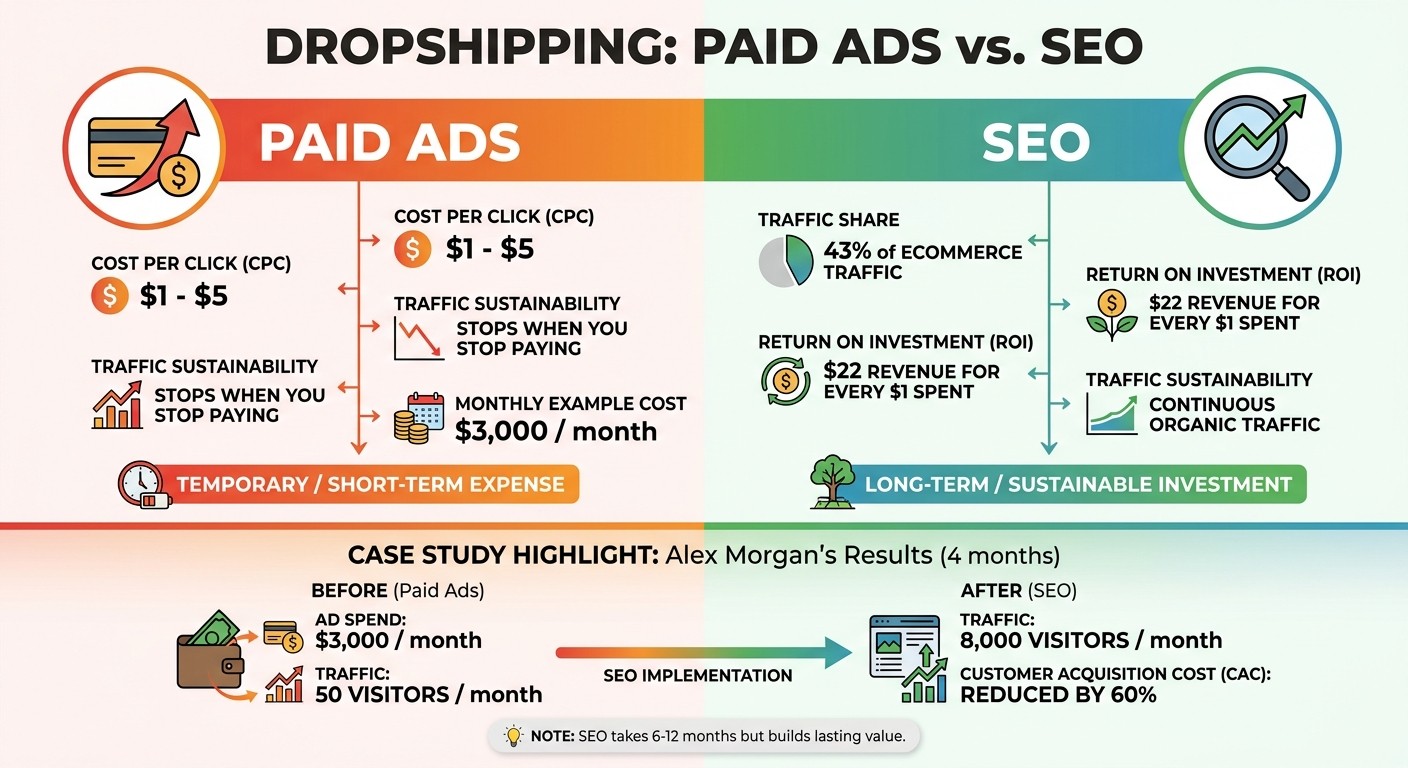
SEO vs Paid Ads for Dropshipping: Cost and ROI Comparison
Keyword Research for Product Pages
Finding Keywords That Drive Sales
The right keywords connect your products to shoppers who are ready to buy. With over 70% of online shoppers starting their product searches on search engines, targeting the wrong keywords can mean losing out on potential sales opportunities.
Start with Google Keyword Planner to explore search volume and cost data (available with a free Google Ads account). For deeper insights, tools like Ubersuggest ($29/month), Ahrefs ($129/month), and SEMrush ($140/month) can help you uncover competitor keyword gaps - these are keywords your competitors rank for but you don’t.
Focus on transactional keywords that indicate buying intent. Look for terms that include modifiers like "buy", "best", "cheap", "reviews", or "discount". For example, in early 2023, SonderCare CEO Kyle Sobko analyzed customer support transcripts for their hospital bed product. He found that many customers were searching for "hospital bed for elderly parents with arthritis." By updating the product title and description with this exact phrase, the page’s conversion rate nearly doubled in just a few weeks.
"There's a big difference between someone typing 'hospital bed' and someone searching 'best home hospital bed for elderly with arthritis.' The first could be anyone... The second is almost definitely a caregiver ready to buy." - Kyle Sobko, CEO, SonderCare
Also, prioritize long-tail keywords - these are specific, detailed phrases that often convert at 2.5 times the rate of broader terms. Shoppers using long-tail keywords typically know exactly what they’re looking for. To confirm a keyword’s buying intent, perform a quick SERP audit: search the term on Google. If the results show shopping carousels and product pages instead of blog posts, it’s a good indicator that the keyword is tied to purchase-ready users.
Once you've zeroed in on your keywords, the next step is integrating them effectively into your product pages.
Adding Keywords to Your Pages
Keyword placement is just as important as keyword selection. Start by including your primary keyword in key areas:
Product title (H1): Place the keyword at the beginning.
Meta title: Keep it under 60 characters.
Meta description: Write a concise, engaging description (150–160 characters) that includes the keyword.
URL: Use a clean, descriptive format like
yourstore.com/waterproof-hiking-boots-men.
In your product description, naturally include the primary keyword within the first 100 words. Use secondary keywords in other sections, focusing on benefits and features. Break up your content with H2 and H3 headings, incorporating long-tail keywords where they fit naturally.
For images, rename files descriptively before uploading. For example, use blue-running-shoes.jpg instead of something generic like IMG_1234.jpg. Add alt text that describes the product, includes a keyword, and provides context. For instance: "Organic cotton baby blanket in sage green, flat lay on nursery crib".
Avoid keyword stuffing - repeating the same phrases unnaturally throughout the page. Over-optimization can lead to search engine penalties and make your content less appealing to readers. Always write with humans in mind, letting keywords flow naturally.
The Ultimate Product Page SEO Guide for eCommerce SEO (2025)
On-Page SEO Basics for Product Pages
Once you've nailed down your keywords, the next step is to strategically use them on your product pages. On-page SEO helps search engines understand your products while giving shoppers a reason to click. Did you know the #1 organic search result gets 39.8% of clicks, nearly double the 18.7% of the second result? Even small adjustments to titles, descriptions, and meta tags can make a difference.
Writing Better Product Titles and Headings
Your product title is a big deal - it's what both Google and shoppers notice first. To make the most of it, place your main keywords right at the start. This ensures they stay visible, even on smaller mobile screens.
Adding specific details like material, color, size, or purpose can also help. For example, instead of a vague title like "The CozyWrap", go for something more targeted like "Organic Cotton Baby Blanket – Breathable, Hypoallergenic". This approach aligns with what shoppers are actively searching for.
Keep your product and meta titles under 60 characters to avoid truncation. On your product page, use an H1 heading for the product name to signal its importance to search engines. You can get creative with a catchy, brand-focused H1 while optimizing your meta title for search.
"The product name should be an H1 heading and accurately describe the product." - Kyle Risley, Senior SEO Lead, Shopify
If you're using Shopify, watch out for the platform's default settings that append your store name to every title. This can waste 20–30 characters of your 60-character limit. To fix it, manually edit the "Search engine listing" section and remove unnecessary store names.
Title Type | Example | SEO Impact |
|---|---|---|
Default/Bad | "Men's Waterproof Hiking Boot - Mountain Gear Supply" | Poor: 62 characters; store name causes truncation of keywords. |
Optimized | "Men's Waterproof Hiking Boot | Gore-Tex, Wide Fit" | Excellent: 52 characters; leads with keywords and includes key details. |
Once your titles are optimized, it's time to focus on crafting descriptions that truly stand out.
Creating Original Product Descriptions
After nailing your titles, the next step is writing descriptions that grab attention. Using the same generic descriptions as your supplier? That’s a big no-no. When multiple stores use identical text, Google has no reason to rank your page higher. In fact, product pages with unique descriptions perform 30% better in search rankings.
Aim for descriptions between 150 and 300 words - long enough for Google to understand your page but short enough to keep shoppers engaged. Break your description into three parts: start with features (e.g., specifications), then highlight benefits (what’s in it for the customer).
Make sure your primary keyword appears naturally in the first sentence, and sprinkle in long-tail keywords throughout. For example, instead of just "hiking boots", try "waterproof hiking boots for wide feet" to attract shoppers with specific needs.
Keep your content easy to scan by using bullet points, bold text, and subheadings. With over 65% of ecommerce traffic coming from mobile devices, short paragraphs (2–3 sentences) and front-loaded benefits work best. Always ask yourself, "So what?" For instance, instead of just listing "coconut-derived surfactant", explain why it matters: "gentle enough for your face".
"If you are still using the descriptions your supplier sent, you are sharing identical content with every other store that sells the same product. Google has no reason to rank your page over theirs." - Akash Radadiya, Adfinite
With descriptions polished, the final step is fine-tuning your meta descriptions to drive clicks.
Writing Meta Descriptions That Get Clicks
Meta descriptions might not directly impact rankings, but they play a big role in click-through rates (CTR) - and CTR can influence rankings over time. Think of them as mini ads designed to entice users to click.
To avoid truncation, keep meta descriptions under 160 characters for desktop and 110–120 characters for mobile. Start with your primary keywords and highlight key benefits, as mobile screens may cut off the rest.
Incorporate your target keyword naturally, as Google often bolds matching terms in the search snippet, making your listing stand out. Use action-oriented phrases like "Shop now", "Explore the collection", or "Browse our products", and emphasize benefits such as "Ships in 24 hours", "Dishwasher safe", or "2-year warranty".
"Think of meta descriptions as a continuation of your brand and an opportunity to clearly define your USP using relevant keywords. They're little ads." - Stephen Light, CMO and Co-owner, Nolah
For the best results, write unique meta descriptions for your top 20 highest-traffic pages and bestsellers. While AI tools can help with bulk descriptions, manually crafted ones for key products often perform better. Keep in mind, Google rewrites meta descriptions about 63% of the time, often pulling text from your page to better match specific search queries.
Optimizing Product Images for SEO
Well-optimized images go hand-in-hand with strong titles and descriptions to improve your product page rankings. They don't just enhance your SEO but also help drive more traffic to your site. Did you know that Google Images accounts for about 22.6% of all Google searches? That’s more than YouTube, Google Maps, and Google News combined! Even better, people searching through images are 63% more likely to make a purchase compared to those using standard text searches. Despite this, around 63% of websites lack proper image optimization, meaning many dropshipping stores are missing out on valuable traffic.
Naming Image Files Correctly
Before uploading product images, make sure to rename the files. Google uses image filenames as a signal to understand what’s in the image. Default file names like IMG_4532.jpg don’t do anything for SEO. Instead, try a straightforward format like this: [product-name]-[key-feature]-[color]-[angle].jpg. For example, replace DSC_0012.jpg with something like mens-leather-wallet-brown-front.jpg.
Here are a few tips for naming files:
Use hyphens, not underscores. Google treats hyphens as spaces, while underscores link words together.
Stick to lowercase letters only.
Keep filenames short - around 3–6 words and under 60 characters.
"The clearer you can be about what an image depicts, it's all the better for a search engine - and a file name is one of the clearest, easiest signals you can provide."
– Greg Bernhardt, Senior SEO Strategist, Shopify
If you're on Shopify, remember that filenames can’t be changed after uploading. Rename them on your computer first. For products with multiple variants, include details like color or style in the filename (e.g., -navy-blue) to ensure accuracy in Google Shopping feeds.
Once your filenames are set, the next steps are writing clear alt text and compressing the images.
Adding Alt Text and Compressing Images
Alt Text Guidelines
Alt text is crucial because search engines can’t "see" images - they rely on this text to figure out what an image represents. It's also important for accessibility since screen readers use it to describe images to visually impaired users. On top of that, modern AI tools like GPT-4o and Gemini also use alt text to understand image content.
Here’s a simple structure for writing alt text:
[Product Name] - [Key Feature] - [Color/Style] - [View/Angle].
For instance, instead of something generic like "shoes", go for a detailed description like:
"Men’s lightweight mesh running shoes in navy blue - side view".
Keep alt text under 125 characters to avoid truncation by screen readers. Also, skip redundant phrases like "image of" or "photo of."
Image Compression
After adding alt text, compress your images to keep your site loading quickly. Images often make up 50–75% of a webpage’s total weight. Delays in load times can hurt - bounce rates jump by 32% when load times increase from one to three seconds. Aim for file sizes under 100 KB.
Use tools like:
These can reduce file sizes by 60–80%. Shopify users can also automate compression with apps like TinyIMG or Crush Pics. Switching to the WebP format can shrink file sizes by another 25–35% compared to JPEGs. Finally, resize images to a width of 1,200–2,048 pixels before uploading.
"In our audits of over 500 websites, image optimization consistently delivers the fastest page speed improvements. Switching to WebP and adding proper alt text are two changes that take minutes per image but can improve your LCP score by 40%."
– Atilla Kuruk, SEO & AI Search Specialist
Technical SEO for Product Pages
Your product pages aren't just about showcasing products - they're critical for driving conversions. By improving their technical performance, you can support long-term growth in organic traffic while enhancing user experience.
Making Your Pages Load Faster
Page speed impacts both user experience and Google rankings. Did you know that 40% of users leave a site if it takes over 3 seconds to load? Even a one-second delay can reduce conversions by 7%, while shaving off just 0.1 seconds on mobile can increase conversion rates by 8.4%.
If you've already optimized images, the next step is to focus on Google's Core Web Vitals, which measure page performance:
Largest Contentful Paint (LCP): Ensure main content loads in under 2.5 seconds.
Interaction to Next Paint (INP): Interactive elements should respond within 200 milliseconds.
Cumulative Layout Shift (CLS): Keep visual shifts during loading under 0.1.
Metric | Target Score | What It Measures |
|---|---|---|
Largest Contentful Paint | Under 2.5 seconds | Speed of main content load |
Interaction to Next Paint | Under 200 ms | Responsiveness of interactive elements |
Cumulative Layout Shift | Under 0.1 | Visual stability during page load |
Here's a real-world example: A sneaker store in Miami improved its LCP from 5.8 seconds to 1.9 seconds, reduced CLS from 0.38 to 0.04, and dropped INP from 450 ms to 120 ms. The result? Their conversion rate jumped from 1.2% to 3.4%, bringing in an extra $180,000 in monthly revenue.
To achieve similar results:
Remove unused third-party apps, as each adds extra JavaScript and CSS. Stick to 5–7 essential apps instead of overloading your site with 12 or more.
Switch to a lightweight Shopify theme like Dawn instead of heavy commercial themes.
Minify HTML, CSS, and JavaScript, and defer non-essential scripts.
Once your pages load quickly, it's time to ensure they perform just as well on mobile.
Making Your Store Mobile-Friendly
With over 64% of global web traffic coming from mobile devices as of July 2025, a strong mobile experience is non-negotiable. Google prioritizes mobile performance when ranking sites, so a slow or clunky mobile site can hurt your visibility - even if your desktop site is flawless.
Responsive design is key. Most Shopify themes are already optimized for mobile, but you should still test your pages using Chrome DevTools to simulate different screen resolutions. Pay attention to touch targets (e.g., "Add to Cart" buttons should be at least 48x48 pixels) and ensure body text is no smaller than 16px for easy reading.
"If the mobile version is stripped down, slow, or hard to navigate, Google treats that as your primary experience. A flawless desktop site cannot compensate for weak mobile performance." – Azra Kassam, Shopify
Avoid intrusive interstitials like pop-ups that block content on mobile - Google penalizes such practices. Ensure your mobile pages include all critical information, such as product descriptions, reviews, and structured data. Use Google Search Console to monitor mobile performance and address any issues.
With mobile optimization in place, you can further enhance visibility with structured data.
Adding Structured Data to Product Pages
Structured data is a game-changer for product pages. By adding schema markup, you help Google understand your product details and display rich snippets in search results. These snippets - showing star ratings, prices, and stock status - can increase click-through rates by 30% and improve rankings by up to 83%.
Google recommends using the JSON-LD format for schema markup because it keeps the code separate from visible content, making it easier to manage. At a minimum, include these fields:
Required Field | Description |
|---|---|
name | Product title |
offers.price | Current price (e.g., 29.99) |
offers.priceCurrency | Currency code (e.g., USD) |
offers.availability | Stock status (e.g., InStock, OutOfStock) |
aggregateRating | Average rating and total review count |
image | URL of at least one product image |
"SEO structured data acts as the 'technical handshake' between your catalog and search algorithms." – Butterflai
For Shopify stores, create a custom json-ld-product.liquid snippet to dynamically pull product details like product.title and product.variants. If managing a large catalog, apps like Plug in SEO (Pro: $20/month) or Smart SEO (Pro: $4.99/month) can automate the process.
Before deploying, validate your schema using tools like Google Rich Results Test and Schema Markup Validator. Ensure your JSON-LD matches your visible HTML and Merchant Feed to avoid inconsistencies that could trigger Google Search Console warnings. Regularly check the "Merchant Listings" report in Google Search Console to spot and fix price mismatches - especially before big sales events like Black Friday.
Internal Linking for Dropshipping Stores
Internal links are the glue that holds your website together, giving you full control over how authority flows across your pages. Unlike backlinks, which rely on external sites, internal links let you decide where to direct traffic, what anchor text to use, and how to structure your store’s hierarchy. When done well, they help search engines understand your site’s layout, connect your product pages, and identify which pages are most important.
The benefits are clear. A study revealed that 26% of top-ranking pages had strong internal link structures, compared to just 7% of pages stuck on page two. Stores that refine their internal linking often experience 20-40% better crawl coverage, enabling Google to index more products. For instance, a retail brand in February 2026 boosted internal links on underperforming product pages and enjoyed a 23% increase in organic traffic.
But it’s not just about SEO - internal links also improve the shopping experience. Keeping key products within three clicks of your homepage makes it easier for customers to find what they need, reducing bounce rates. Links between related products can raise average order value by 15-25%, while blog-to-product links can lead to 20-35% more sessions and 8-12% higher conversions.
Linking from Blog Posts to Products
Blog posts are a great way to engage shoppers early in their buying journey. By addressing common questions and smoothly transitioning readers to your product pages, you can capture their interest before they’re ready to purchase. Use keyword-rich anchor text to signal relevance to search engines while guiding potential customers.
Keep your links natural and informative. For example, in a blog titled "How to Choose Winter Running Gear", you might include links like "our waterproof trail shoes" or "browse the thermal base layer collection." These descriptive anchors are far more effective than generic phrases like "click here" because they set clear expectations for both users and search engines.
Placement is key. Links in the introduction target early intent, mid-post links add context, and end-of-post links serve as a final call-to-action. Aim to include two to five internal links per 1,000 words to maintain a natural flow and avoid looking spammy. Whenever you publish a new product or guide, revisit 2-3 older blog posts to add links to the new content. This keeps your internal network fresh and helps search engines discover new pages faster.
"Internal linking is the only part of SEO where you have 100% control over the 'editorial' context of your links. To ignore it is to leave your store's growth to chance." – Rank My Shop
Additionally, linking your product pages to relevant blog posts can address customer questions upfront, building trust and reducing return rates. From there, you can strengthen your strategy by connecting related products.
Connecting Related Products
Linking related products encourages shoppers to explore more items while helping search engines understand how your products are connected. The best approach? Use "Frequently Bought Together" modules for complementary items (like a phone case and screen protector) and "You May Also Like" sections for similar alternatives (like different styles of the same jacket).
These links don’t just drive sales - they also spread authority across your site. For example, when a high-traffic product page links to a newer or less popular item, it passes "link equity", giving the linked page a better chance to rank. Just ensure these modules are rendered in HTML, not JavaScript, so search engines can properly crawl them.
For fashion or home decor stores, "Complete the Look" bundles are particularly effective. Linking items like a sofa, coffee table, and rug in a curated set encourages multi-item purchases while creating tightly connected topical clusters that Google recognizes as expertise. You can also embed links naturally in product descriptions, like "This leather wallet pairs perfectly with our slim-fit belts", for added context.
Finally, don’t forget to enable breadcrumbs (e.g., Home > Men's Shoes > Running Shoes). These not only make navigation easier for users but also help search engines understand your site’s hierarchy, which can lead to rich snippets in search results. Regularly audit your internal links to ensure they’re working as intended and providing a seamless experience for both users and crawlers.
Using BuildMyStores for SEO-Ready Dropshipping
Starting your dropshipping journey with solid SEO can save you countless hours of adjustments later. BuildMyStores offers AI-powered Shopify stores that come with pre-set SEO features, giving you a head start in optimizing for search engines. Considering that 70% of dropshipping businesses depend heavily on organic search to attract customers, having a strong SEO foundation from the beginning is crucial.
This platform has already supported over 100,000 stores worldwide. It provides 100% ownership - no revenue sharing - and delivers a conversion-optimized store in just 5–10 minutes. Each store comes with 10 pre-loaded winning products, automated legal pages, and even a free .store domain. As one user, Emily, shared:
"I had doubts about it being free, but it truly is. Highly recommended!"
AI-Built Stores Optimized for Search
BuildMyStores uses AI-driven SEO optimization and designs its themes with mobile-first performance in mind. With mobile-first indexing being a key ranking factor as of 2026, launching with a mobile-responsive design saves you from future headaches. The platform ensures clean URLs, fast load times, and layouts that are both user-friendly and search engine-friendly.
Once your store is live, it’s a good idea to manually check product titles and meta descriptions to include buyer-intent keywords where necessary. Tools like Google's Rich Results Test can help verify that your product schema - covering price, availability, and reviews - is correctly implemented. This can unlock rich snippets, which often lead to higher click-through rates. Additionally, rewriting supplier-provided descriptions is a smart move to avoid duplicate content and create unique signals for search engines.
These built-in features align perfectly with the SEO strategies discussed earlier, giving you a well-optimized store right from the start. This balance of automated setup and manual customization ensures your store is ready to attract traffic and drive sales effectively.
Fast Setup with Full Control
Beyond the SEO features, BuildMyStores combines speed with flexibility, allowing you to execute your strategies without limitations.
The free plan includes a fully functional store with customization options - no hidden fees or revenue caps. You can fine-tune meta tags, URLs, and alt text to target specific keywords. For users looking for additional perks like premium templates, ad creatives, and priority support, there’s a Pro tier available for a one-time fee of $97.
This mix of quick setup and full control lets you launch your store rapidly while refining it strategically. As John, another user, said:
"Amazing! Their AI saved me a ton of time and money!"
With 24/7 customer support and complete branding control, you’ll have everything you need to implement key SEO tactics - like internal linking, schema markup, and image optimization - right from the start. This approach turns SEO principles into actionable steps that lead to measurable growth in traffic and sales.
Conclusion
Optimizing your dropshipping product pages doesn’t have to feel overwhelming - it just takes steady effort and attention to detail. Start by using long-tail keywords that align with what buyers are searching for, and craft product descriptions that highlight benefits in 150–300 words. Keep meta titles concise (under 60 characters) and lead with your main keyword for better visibility. These straightforward steps can set you apart, especially when only 30% of dropshipping sites bother to optimize their product pages.
On the technical side, compressing images to under 200 KB, ensuring mobile load times stay under 3 seconds, and adding product schema for rich snippets are game-changers. These tweaks can significantly boost your organic click-through rates. Internal linking between related products and blog posts also helps search engines understand your site better, improving crawlability and spreading ranking power across your store.
Organic SEO is a powerhouse for ecommerce, driving 43% of traffic and delivering a $22 return for every $1 spent. Unlike paid ads - where costs on platforms like Facebook and Instagram now average $2–$5 per click - organic traffic grows over time without ongoing costs. Reaching Google’s first page can translate into a 200% boost in sales, thanks to a consistent approach to keyword research, quality content, and technical SEO.
If you’re just getting started, platforms like BuildMyStores provide a solid foundation with features like AI-optimized themes, clean URLs, and mobile-first designs. You can launch quickly while maintaining full control over key SEO elements like meta tags, alt text, and schema markup.
Begin by focusing on your top 10 revenue-driving products. Optimize their titles, descriptions, images, and schema, and use tools like Google Search Console to track progress. Look out for early indicators like increased query impressions and rich snippet appearances. Remember, SEO is a long game - it typically takes 6 to 12 months to see consistent results. But the long-term payoff, from sustainable traffic to a competitive edge, is well worth the wait.
FAQs
Which keywords should I target first for a new product page?
Begin by zeroing in on the main product name and related descriptive terms. Think about what your customers might type into a search bar - this could include the product type, standout features, or key advantages.
Use these keywords strategically across your content, including:
Meta titles: Make sure your titles grab attention while incorporating those essential terms.
Product descriptions: Highlight the product's unique qualities while naturally weaving in the keywords.
Alt text: Optimize image descriptions for accessibility and search engines.
Schema markup: Add structured data to help search engines understand your product better.
To get the best results, focus on keywords that show high search intent - the ones closely tied to your product. This approach helps improve your search rankings and ensures you're connecting with the right audience.
How can I make supplier product descriptions unique without overcomplicating them?
To make supplier product descriptions stand out, shift the focus from just listing features to showcasing how the product benefits the customer. Think about how it solves a problem or improves their daily life. Keep the tone engaging and easy to follow, avoiding unnecessary complexity. Aim for concise descriptions with around 5-6 key points, and use strong action verbs to make the text more persuasive. This strategy not only makes your content more appealing to readers but also helps it perform better in search engines.
What are the quickest technical fixes to improve product page speed and SEO?
If your product pages are lagging behind in speed and search performance, here are some simple yet effective tweaks to get things moving:
Compress your images: Keep your hero images under 200 KB and product images under 100 KB to reduce load times.
Switch to WebP format: This format can cut image sizes by 25-35%, making your pages load faster.
Enable lazy loading: Delay loading images below the fold until they're needed, improving initial page speed.
Minify your code: Simplify HTML, CSS, and JavaScript files to make them as lightweight as possible.
Use a CDN: A content delivery network serves your assets from servers closer to your users, speeding up load times.
These small adjustments can make a big difference in performance and user experience.
Related Blog Posts
Stop relying solely on paid ads for your dropshipping store. SEO can transform your product pages into consistent traffic drivers without the ongoing cost of ads. Paid clicks on platforms like Facebook and Google now cost $1-$5 per click, and once you stop paying, your traffic vanishes. On the other hand, organic search drives 43% of ecommerce traffic and delivers $22 in revenue for every $1 spent.
Here’s how to optimize your product pages for SEO success:
Keyword Research: Use tools like Google Keyword Planner, Ahrefs, or SEMrush to find high-intent, long-tail keywords that match what buyers are searching for.
On-Page SEO: Place keywords in product titles, meta descriptions, URLs, and descriptions. Avoid keyword stuffing and write for humans.
Image Optimization: Rename image files descriptively, add alt text, and compress images to improve page load speed.
Technical SEO: Focus on fast load times, mobile-friendliness, and adding structured data for rich snippets.
Internal Linking: Link related products and blog posts to improve navigation and spread ranking authority.
Case Study: Alex Morgan switched from $3,000/month in Facebook ads to SEO, boosting organic traffic from 50 to 8,000 visitors/month in four months while cutting customer acquisition costs by 60%.
SEO may take time, but it builds lasting value. Start with your top 10 products and track progress using tools like Google Search Console. Over time, consistent SEO efforts can drive sustainable traffic and sales growth.
SEO vs Paid Ads for Dropshipping: Cost and ROI Comparison
Keyword Research for Product Pages
Finding Keywords That Drive Sales
The right keywords connect your products to shoppers who are ready to buy. With over 70% of online shoppers starting their product searches on search engines, targeting the wrong keywords can mean losing out on potential sales opportunities.
Start with Google Keyword Planner to explore search volume and cost data (available with a free Google Ads account). For deeper insights, tools like Ubersuggest ($29/month), Ahrefs ($129/month), and SEMrush ($140/month) can help you uncover competitor keyword gaps - these are keywords your competitors rank for but you don’t.
Focus on transactional keywords that indicate buying intent. Look for terms that include modifiers like "buy", "best", "cheap", "reviews", or "discount". For example, in early 2023, SonderCare CEO Kyle Sobko analyzed customer support transcripts for their hospital bed product. He found that many customers were searching for "hospital bed for elderly parents with arthritis." By updating the product title and description with this exact phrase, the page’s conversion rate nearly doubled in just a few weeks.
"There's a big difference between someone typing 'hospital bed' and someone searching 'best home hospital bed for elderly with arthritis.' The first could be anyone... The second is almost definitely a caregiver ready to buy." - Kyle Sobko, CEO, SonderCare
Also, prioritize long-tail keywords - these are specific, detailed phrases that often convert at 2.5 times the rate of broader terms. Shoppers using long-tail keywords typically know exactly what they’re looking for. To confirm a keyword’s buying intent, perform a quick SERP audit: search the term on Google. If the results show shopping carousels and product pages instead of blog posts, it’s a good indicator that the keyword is tied to purchase-ready users.
Once you've zeroed in on your keywords, the next step is integrating them effectively into your product pages.
Adding Keywords to Your Pages
Keyword placement is just as important as keyword selection. Start by including your primary keyword in key areas:
Product title (H1): Place the keyword at the beginning.
Meta title: Keep it under 60 characters.
Meta description: Write a concise, engaging description (150–160 characters) that includes the keyword.
URL: Use a clean, descriptive format like
yourstore.com/waterproof-hiking-boots-men.
In your product description, naturally include the primary keyword within the first 100 words. Use secondary keywords in other sections, focusing on benefits and features. Break up your content with H2 and H3 headings, incorporating long-tail keywords where they fit naturally.
For images, rename files descriptively before uploading. For example, use blue-running-shoes.jpg instead of something generic like IMG_1234.jpg. Add alt text that describes the product, includes a keyword, and provides context. For instance: "Organic cotton baby blanket in sage green, flat lay on nursery crib".
Avoid keyword stuffing - repeating the same phrases unnaturally throughout the page. Over-optimization can lead to search engine penalties and make your content less appealing to readers. Always write with humans in mind, letting keywords flow naturally.
The Ultimate Product Page SEO Guide for eCommerce SEO (2025)
On-Page SEO Basics for Product Pages
Once you've nailed down your keywords, the next step is to strategically use them on your product pages. On-page SEO helps search engines understand your products while giving shoppers a reason to click. Did you know the #1 organic search result gets 39.8% of clicks, nearly double the 18.7% of the second result? Even small adjustments to titles, descriptions, and meta tags can make a difference.
Writing Better Product Titles and Headings
Your product title is a big deal - it's what both Google and shoppers notice first. To make the most of it, place your main keywords right at the start. This ensures they stay visible, even on smaller mobile screens.
Adding specific details like material, color, size, or purpose can also help. For example, instead of a vague title like "The CozyWrap", go for something more targeted like "Organic Cotton Baby Blanket – Breathable, Hypoallergenic". This approach aligns with what shoppers are actively searching for.
Keep your product and meta titles under 60 characters to avoid truncation. On your product page, use an H1 heading for the product name to signal its importance to search engines. You can get creative with a catchy, brand-focused H1 while optimizing your meta title for search.
"The product name should be an H1 heading and accurately describe the product." - Kyle Risley, Senior SEO Lead, Shopify
If you're using Shopify, watch out for the platform's default settings that append your store name to every title. This can waste 20–30 characters of your 60-character limit. To fix it, manually edit the "Search engine listing" section and remove unnecessary store names.
Title Type | Example | SEO Impact |
|---|---|---|
Default/Bad | "Men's Waterproof Hiking Boot - Mountain Gear Supply" | Poor: 62 characters; store name causes truncation of keywords. |
Optimized | "Men's Waterproof Hiking Boot | Gore-Tex, Wide Fit" | Excellent: 52 characters; leads with keywords and includes key details. |
Once your titles are optimized, it's time to focus on crafting descriptions that truly stand out.
Creating Original Product Descriptions
After nailing your titles, the next step is writing descriptions that grab attention. Using the same generic descriptions as your supplier? That’s a big no-no. When multiple stores use identical text, Google has no reason to rank your page higher. In fact, product pages with unique descriptions perform 30% better in search rankings.
Aim for descriptions between 150 and 300 words - long enough for Google to understand your page but short enough to keep shoppers engaged. Break your description into three parts: start with features (e.g., specifications), then highlight benefits (what’s in it for the customer).
Make sure your primary keyword appears naturally in the first sentence, and sprinkle in long-tail keywords throughout. For example, instead of just "hiking boots", try "waterproof hiking boots for wide feet" to attract shoppers with specific needs.
Keep your content easy to scan by using bullet points, bold text, and subheadings. With over 65% of ecommerce traffic coming from mobile devices, short paragraphs (2–3 sentences) and front-loaded benefits work best. Always ask yourself, "So what?" For instance, instead of just listing "coconut-derived surfactant", explain why it matters: "gentle enough for your face".
"If you are still using the descriptions your supplier sent, you are sharing identical content with every other store that sells the same product. Google has no reason to rank your page over theirs." - Akash Radadiya, Adfinite
With descriptions polished, the final step is fine-tuning your meta descriptions to drive clicks.
Writing Meta Descriptions That Get Clicks
Meta descriptions might not directly impact rankings, but they play a big role in click-through rates (CTR) - and CTR can influence rankings over time. Think of them as mini ads designed to entice users to click.
To avoid truncation, keep meta descriptions under 160 characters for desktop and 110–120 characters for mobile. Start with your primary keywords and highlight key benefits, as mobile screens may cut off the rest.
Incorporate your target keyword naturally, as Google often bolds matching terms in the search snippet, making your listing stand out. Use action-oriented phrases like "Shop now", "Explore the collection", or "Browse our products", and emphasize benefits such as "Ships in 24 hours", "Dishwasher safe", or "2-year warranty".
"Think of meta descriptions as a continuation of your brand and an opportunity to clearly define your USP using relevant keywords. They're little ads." - Stephen Light, CMO and Co-owner, Nolah
For the best results, write unique meta descriptions for your top 20 highest-traffic pages and bestsellers. While AI tools can help with bulk descriptions, manually crafted ones for key products often perform better. Keep in mind, Google rewrites meta descriptions about 63% of the time, often pulling text from your page to better match specific search queries.
Optimizing Product Images for SEO
Well-optimized images go hand-in-hand with strong titles and descriptions to improve your product page rankings. They don't just enhance your SEO but also help drive more traffic to your site. Did you know that Google Images accounts for about 22.6% of all Google searches? That’s more than YouTube, Google Maps, and Google News combined! Even better, people searching through images are 63% more likely to make a purchase compared to those using standard text searches. Despite this, around 63% of websites lack proper image optimization, meaning many dropshipping stores are missing out on valuable traffic.
Naming Image Files Correctly
Before uploading product images, make sure to rename the files. Google uses image filenames as a signal to understand what’s in the image. Default file names like IMG_4532.jpg don’t do anything for SEO. Instead, try a straightforward format like this: [product-name]-[key-feature]-[color]-[angle].jpg. For example, replace DSC_0012.jpg with something like mens-leather-wallet-brown-front.jpg.
Here are a few tips for naming files:
Use hyphens, not underscores. Google treats hyphens as spaces, while underscores link words together.
Stick to lowercase letters only.
Keep filenames short - around 3–6 words and under 60 characters.
"The clearer you can be about what an image depicts, it's all the better for a search engine - and a file name is one of the clearest, easiest signals you can provide."
– Greg Bernhardt, Senior SEO Strategist, Shopify
If you're on Shopify, remember that filenames can’t be changed after uploading. Rename them on your computer first. For products with multiple variants, include details like color or style in the filename (e.g., -navy-blue) to ensure accuracy in Google Shopping feeds.
Once your filenames are set, the next steps are writing clear alt text and compressing the images.
Adding Alt Text and Compressing Images
Alt Text Guidelines
Alt text is crucial because search engines can’t "see" images - they rely on this text to figure out what an image represents. It's also important for accessibility since screen readers use it to describe images to visually impaired users. On top of that, modern AI tools like GPT-4o and Gemini also use alt text to understand image content.
Here’s a simple structure for writing alt text:
[Product Name] - [Key Feature] - [Color/Style] - [View/Angle].
For instance, instead of something generic like "shoes", go for a detailed description like:
"Men’s lightweight mesh running shoes in navy blue - side view".
Keep alt text under 125 characters to avoid truncation by screen readers. Also, skip redundant phrases like "image of" or "photo of."
Image Compression
After adding alt text, compress your images to keep your site loading quickly. Images often make up 50–75% of a webpage’s total weight. Delays in load times can hurt - bounce rates jump by 32% when load times increase from one to three seconds. Aim for file sizes under 100 KB.
Use tools like:
These can reduce file sizes by 60–80%. Shopify users can also automate compression with apps like TinyIMG or Crush Pics. Switching to the WebP format can shrink file sizes by another 25–35% compared to JPEGs. Finally, resize images to a width of 1,200–2,048 pixels before uploading.
"In our audits of over 500 websites, image optimization consistently delivers the fastest page speed improvements. Switching to WebP and adding proper alt text are two changes that take minutes per image but can improve your LCP score by 40%."
– Atilla Kuruk, SEO & AI Search Specialist
Technical SEO for Product Pages
Your product pages aren't just about showcasing products - they're critical for driving conversions. By improving their technical performance, you can support long-term growth in organic traffic while enhancing user experience.
Making Your Pages Load Faster
Page speed impacts both user experience and Google rankings. Did you know that 40% of users leave a site if it takes over 3 seconds to load? Even a one-second delay can reduce conversions by 7%, while shaving off just 0.1 seconds on mobile can increase conversion rates by 8.4%.
If you've already optimized images, the next step is to focus on Google's Core Web Vitals, which measure page performance:
Largest Contentful Paint (LCP): Ensure main content loads in under 2.5 seconds.
Interaction to Next Paint (INP): Interactive elements should respond within 200 milliseconds.
Cumulative Layout Shift (CLS): Keep visual shifts during loading under 0.1.
Metric | Target Score | What It Measures |
|---|---|---|
Largest Contentful Paint | Under 2.5 seconds | Speed of main content load |
Interaction to Next Paint | Under 200 ms | Responsiveness of interactive elements |
Cumulative Layout Shift | Under 0.1 | Visual stability during page load |
Here's a real-world example: A sneaker store in Miami improved its LCP from 5.8 seconds to 1.9 seconds, reduced CLS from 0.38 to 0.04, and dropped INP from 450 ms to 120 ms. The result? Their conversion rate jumped from 1.2% to 3.4%, bringing in an extra $180,000 in monthly revenue.
To achieve similar results:
Remove unused third-party apps, as each adds extra JavaScript and CSS. Stick to 5–7 essential apps instead of overloading your site with 12 or more.
Switch to a lightweight Shopify theme like Dawn instead of heavy commercial themes.
Minify HTML, CSS, and JavaScript, and defer non-essential scripts.
Once your pages load quickly, it's time to ensure they perform just as well on mobile.
Making Your Store Mobile-Friendly
With over 64% of global web traffic coming from mobile devices as of July 2025, a strong mobile experience is non-negotiable. Google prioritizes mobile performance when ranking sites, so a slow or clunky mobile site can hurt your visibility - even if your desktop site is flawless.
Responsive design is key. Most Shopify themes are already optimized for mobile, but you should still test your pages using Chrome DevTools to simulate different screen resolutions. Pay attention to touch targets (e.g., "Add to Cart" buttons should be at least 48x48 pixels) and ensure body text is no smaller than 16px for easy reading.
"If the mobile version is stripped down, slow, or hard to navigate, Google treats that as your primary experience. A flawless desktop site cannot compensate for weak mobile performance." – Azra Kassam, Shopify
Avoid intrusive interstitials like pop-ups that block content on mobile - Google penalizes such practices. Ensure your mobile pages include all critical information, such as product descriptions, reviews, and structured data. Use Google Search Console to monitor mobile performance and address any issues.
With mobile optimization in place, you can further enhance visibility with structured data.
Adding Structured Data to Product Pages
Structured data is a game-changer for product pages. By adding schema markup, you help Google understand your product details and display rich snippets in search results. These snippets - showing star ratings, prices, and stock status - can increase click-through rates by 30% and improve rankings by up to 83%.
Google recommends using the JSON-LD format for schema markup because it keeps the code separate from visible content, making it easier to manage. At a minimum, include these fields:
Required Field | Description |
|---|---|
name | Product title |
offers.price | Current price (e.g., 29.99) |
offers.priceCurrency | Currency code (e.g., USD) |
offers.availability | Stock status (e.g., InStock, OutOfStock) |
aggregateRating | Average rating and total review count |
image | URL of at least one product image |
"SEO structured data acts as the 'technical handshake' between your catalog and search algorithms." – Butterflai
For Shopify stores, create a custom json-ld-product.liquid snippet to dynamically pull product details like product.title and product.variants. If managing a large catalog, apps like Plug in SEO (Pro: $20/month) or Smart SEO (Pro: $4.99/month) can automate the process.
Before deploying, validate your schema using tools like Google Rich Results Test and Schema Markup Validator. Ensure your JSON-LD matches your visible HTML and Merchant Feed to avoid inconsistencies that could trigger Google Search Console warnings. Regularly check the "Merchant Listings" report in Google Search Console to spot and fix price mismatches - especially before big sales events like Black Friday.
Internal Linking for Dropshipping Stores
Internal links are the glue that holds your website together, giving you full control over how authority flows across your pages. Unlike backlinks, which rely on external sites, internal links let you decide where to direct traffic, what anchor text to use, and how to structure your store’s hierarchy. When done well, they help search engines understand your site’s layout, connect your product pages, and identify which pages are most important.
The benefits are clear. A study revealed that 26% of top-ranking pages had strong internal link structures, compared to just 7% of pages stuck on page two. Stores that refine their internal linking often experience 20-40% better crawl coverage, enabling Google to index more products. For instance, a retail brand in February 2026 boosted internal links on underperforming product pages and enjoyed a 23% increase in organic traffic.
But it’s not just about SEO - internal links also improve the shopping experience. Keeping key products within three clicks of your homepage makes it easier for customers to find what they need, reducing bounce rates. Links between related products can raise average order value by 15-25%, while blog-to-product links can lead to 20-35% more sessions and 8-12% higher conversions.
Linking from Blog Posts to Products
Blog posts are a great way to engage shoppers early in their buying journey. By addressing common questions and smoothly transitioning readers to your product pages, you can capture their interest before they’re ready to purchase. Use keyword-rich anchor text to signal relevance to search engines while guiding potential customers.
Keep your links natural and informative. For example, in a blog titled "How to Choose Winter Running Gear", you might include links like "our waterproof trail shoes" or "browse the thermal base layer collection." These descriptive anchors are far more effective than generic phrases like "click here" because they set clear expectations for both users and search engines.
Placement is key. Links in the introduction target early intent, mid-post links add context, and end-of-post links serve as a final call-to-action. Aim to include two to five internal links per 1,000 words to maintain a natural flow and avoid looking spammy. Whenever you publish a new product or guide, revisit 2-3 older blog posts to add links to the new content. This keeps your internal network fresh and helps search engines discover new pages faster.
"Internal linking is the only part of SEO where you have 100% control over the 'editorial' context of your links. To ignore it is to leave your store's growth to chance." – Rank My Shop
Additionally, linking your product pages to relevant blog posts can address customer questions upfront, building trust and reducing return rates. From there, you can strengthen your strategy by connecting related products.
Connecting Related Products
Linking related products encourages shoppers to explore more items while helping search engines understand how your products are connected. The best approach? Use "Frequently Bought Together" modules for complementary items (like a phone case and screen protector) and "You May Also Like" sections for similar alternatives (like different styles of the same jacket).
These links don’t just drive sales - they also spread authority across your site. For example, when a high-traffic product page links to a newer or less popular item, it passes "link equity", giving the linked page a better chance to rank. Just ensure these modules are rendered in HTML, not JavaScript, so search engines can properly crawl them.
For fashion or home decor stores, "Complete the Look" bundles are particularly effective. Linking items like a sofa, coffee table, and rug in a curated set encourages multi-item purchases while creating tightly connected topical clusters that Google recognizes as expertise. You can also embed links naturally in product descriptions, like "This leather wallet pairs perfectly with our slim-fit belts", for added context.
Finally, don’t forget to enable breadcrumbs (e.g., Home > Men's Shoes > Running Shoes). These not only make navigation easier for users but also help search engines understand your site’s hierarchy, which can lead to rich snippets in search results. Regularly audit your internal links to ensure they’re working as intended and providing a seamless experience for both users and crawlers.
Using BuildMyStores for SEO-Ready Dropshipping
Starting your dropshipping journey with solid SEO can save you countless hours of adjustments later. BuildMyStores offers AI-powered Shopify stores that come with pre-set SEO features, giving you a head start in optimizing for search engines. Considering that 70% of dropshipping businesses depend heavily on organic search to attract customers, having a strong SEO foundation from the beginning is crucial.
This platform has already supported over 100,000 stores worldwide. It provides 100% ownership - no revenue sharing - and delivers a conversion-optimized store in just 5–10 minutes. Each store comes with 10 pre-loaded winning products, automated legal pages, and even a free .store domain. As one user, Emily, shared:
"I had doubts about it being free, but it truly is. Highly recommended!"
AI-Built Stores Optimized for Search
BuildMyStores uses AI-driven SEO optimization and designs its themes with mobile-first performance in mind. With mobile-first indexing being a key ranking factor as of 2026, launching with a mobile-responsive design saves you from future headaches. The platform ensures clean URLs, fast load times, and layouts that are both user-friendly and search engine-friendly.
Once your store is live, it’s a good idea to manually check product titles and meta descriptions to include buyer-intent keywords where necessary. Tools like Google's Rich Results Test can help verify that your product schema - covering price, availability, and reviews - is correctly implemented. This can unlock rich snippets, which often lead to higher click-through rates. Additionally, rewriting supplier-provided descriptions is a smart move to avoid duplicate content and create unique signals for search engines.
These built-in features align perfectly with the SEO strategies discussed earlier, giving you a well-optimized store right from the start. This balance of automated setup and manual customization ensures your store is ready to attract traffic and drive sales effectively.
Fast Setup with Full Control
Beyond the SEO features, BuildMyStores combines speed with flexibility, allowing you to execute your strategies without limitations.
The free plan includes a fully functional store with customization options - no hidden fees or revenue caps. You can fine-tune meta tags, URLs, and alt text to target specific keywords. For users looking for additional perks like premium templates, ad creatives, and priority support, there’s a Pro tier available for a one-time fee of $97.
This mix of quick setup and full control lets you launch your store rapidly while refining it strategically. As John, another user, said:
"Amazing! Their AI saved me a ton of time and money!"
With 24/7 customer support and complete branding control, you’ll have everything you need to implement key SEO tactics - like internal linking, schema markup, and image optimization - right from the start. This approach turns SEO principles into actionable steps that lead to measurable growth in traffic and sales.
Conclusion
Optimizing your dropshipping product pages doesn’t have to feel overwhelming - it just takes steady effort and attention to detail. Start by using long-tail keywords that align with what buyers are searching for, and craft product descriptions that highlight benefits in 150–300 words. Keep meta titles concise (under 60 characters) and lead with your main keyword for better visibility. These straightforward steps can set you apart, especially when only 30% of dropshipping sites bother to optimize their product pages.
On the technical side, compressing images to under 200 KB, ensuring mobile load times stay under 3 seconds, and adding product schema for rich snippets are game-changers. These tweaks can significantly boost your organic click-through rates. Internal linking between related products and blog posts also helps search engines understand your site better, improving crawlability and spreading ranking power across your store.
Organic SEO is a powerhouse for ecommerce, driving 43% of traffic and delivering a $22 return for every $1 spent. Unlike paid ads - where costs on platforms like Facebook and Instagram now average $2–$5 per click - organic traffic grows over time without ongoing costs. Reaching Google’s first page can translate into a 200% boost in sales, thanks to a consistent approach to keyword research, quality content, and technical SEO.
If you’re just getting started, platforms like BuildMyStores provide a solid foundation with features like AI-optimized themes, clean URLs, and mobile-first designs. You can launch quickly while maintaining full control over key SEO elements like meta tags, alt text, and schema markup.
Begin by focusing on your top 10 revenue-driving products. Optimize their titles, descriptions, images, and schema, and use tools like Google Search Console to track progress. Look out for early indicators like increased query impressions and rich snippet appearances. Remember, SEO is a long game - it typically takes 6 to 12 months to see consistent results. But the long-term payoff, from sustainable traffic to a competitive edge, is well worth the wait.
FAQs
Which keywords should I target first for a new product page?
Begin by zeroing in on the main product name and related descriptive terms. Think about what your customers might type into a search bar - this could include the product type, standout features, or key advantages.
Use these keywords strategically across your content, including:
Meta titles: Make sure your titles grab attention while incorporating those essential terms.
Product descriptions: Highlight the product's unique qualities while naturally weaving in the keywords.
Alt text: Optimize image descriptions for accessibility and search engines.
Schema markup: Add structured data to help search engines understand your product better.
To get the best results, focus on keywords that show high search intent - the ones closely tied to your product. This approach helps improve your search rankings and ensures you're connecting with the right audience.
How can I make supplier product descriptions unique without overcomplicating them?
To make supplier product descriptions stand out, shift the focus from just listing features to showcasing how the product benefits the customer. Think about how it solves a problem or improves their daily life. Keep the tone engaging and easy to follow, avoiding unnecessary complexity. Aim for concise descriptions with around 5-6 key points, and use strong action verbs to make the text more persuasive. This strategy not only makes your content more appealing to readers but also helps it perform better in search engines.
What are the quickest technical fixes to improve product page speed and SEO?
If your product pages are lagging behind in speed and search performance, here are some simple yet effective tweaks to get things moving:
Compress your images: Keep your hero images under 200 KB and product images under 100 KB to reduce load times.
Switch to WebP format: This format can cut image sizes by 25-35%, making your pages load faster.
Enable lazy loading: Delay loading images below the fold until they're needed, improving initial page speed.
Minify your code: Simplify HTML, CSS, and JavaScript files to make them as lightweight as possible.
Use a CDN: A content delivery network serves your assets from servers closer to your users, speeding up load times.
These small adjustments can make a big difference in performance and user experience.
Related Blog Posts
Get your store!
© 2025 BuildMyStores
© 2025 BuildMyStores