🎉 Start Shopify’s $1 Plan and We’ll pay you up to $3,600 just for starting! 💸 — Limited Time
Get Limited Time Offer 💰
Offer Details — Rewards require completing eligible third-party offers. Reward amounts vary from $30 to $3,600. Terms and eligibility restrictions apply.
🎉 Start Shopify’s $1 Plan and We’ll pay you up to $3,600 just for starting! 💸 — Limited Time
Get Limited Time Offer 💰
Offer Details — Rewards require completing eligible third-party offers. Reward amounts vary from $30 to $3,600. Terms and eligibility restrictions apply.
🎉 Start Shopify’s $1 Plan and We’ll pay you up to $3,600 just for starting! 💸 — Limited Time
Get Limited Time Offer 💰
Offer Details — Rewards require completing eligible third-party offers. Reward amounts vary from $30 to $3,600. Terms and eligibility restrictions apply.
Ecommerce Strategies
How AI Optimizes Inventory for Shopify Stores
How AI Optimizes Inventory for Shopify Stores

Bad inventory calls can drain cash fast. In many Shopify stores, spreadsheet forecasts miss demand by 25% to 40%, while AI-based forecasting can cut that error to 5% to 15%.
If I were setting this up, I’d keep the focus on four things:
Clean store data first: sales history, SKU/variant records, stock counts, returns, promo dates, and actual supplier lead times
Better forecasts: AI looks at sales patterns, seasonality, promos, and lead times instead of just past averages
Smarter reordering: set lead time, safety stock, and reorder points with a simple formula
Weekly and monthly reviews: track forecast accuracy, stockout rate, sell-through, and days of supply
Here’s the short version:
AI helps you spot stockouts before they happen
It can also flag slow movers that lock up cash
New stores often get hit hardest because one ad, post, or sale can wipe out stock in hours
Good forecasts depend on at least 6–12 months of clean SKU-level sales data
A common reorder point formula is: (Average Daily Sales × Lead Time) + Safety Stock
Good targets include 85%–95% forecast accuracy, under 2% stockout rate, and 25–45 days of supply
A quick way I’d think about it: manual tracking counts stock, AI forecasting estimates demand, and automated reordering places the buy decision on rules. Put together, they give you a simpler way to keep products in stock without tying up more money than you need to.
Below, I’ll walk through the main ideas in plain English so you can see how the system fits together.
Using AI to Manage Shopify Inventory Faster

What AI Inventory Optimization Does for Shopify Stores
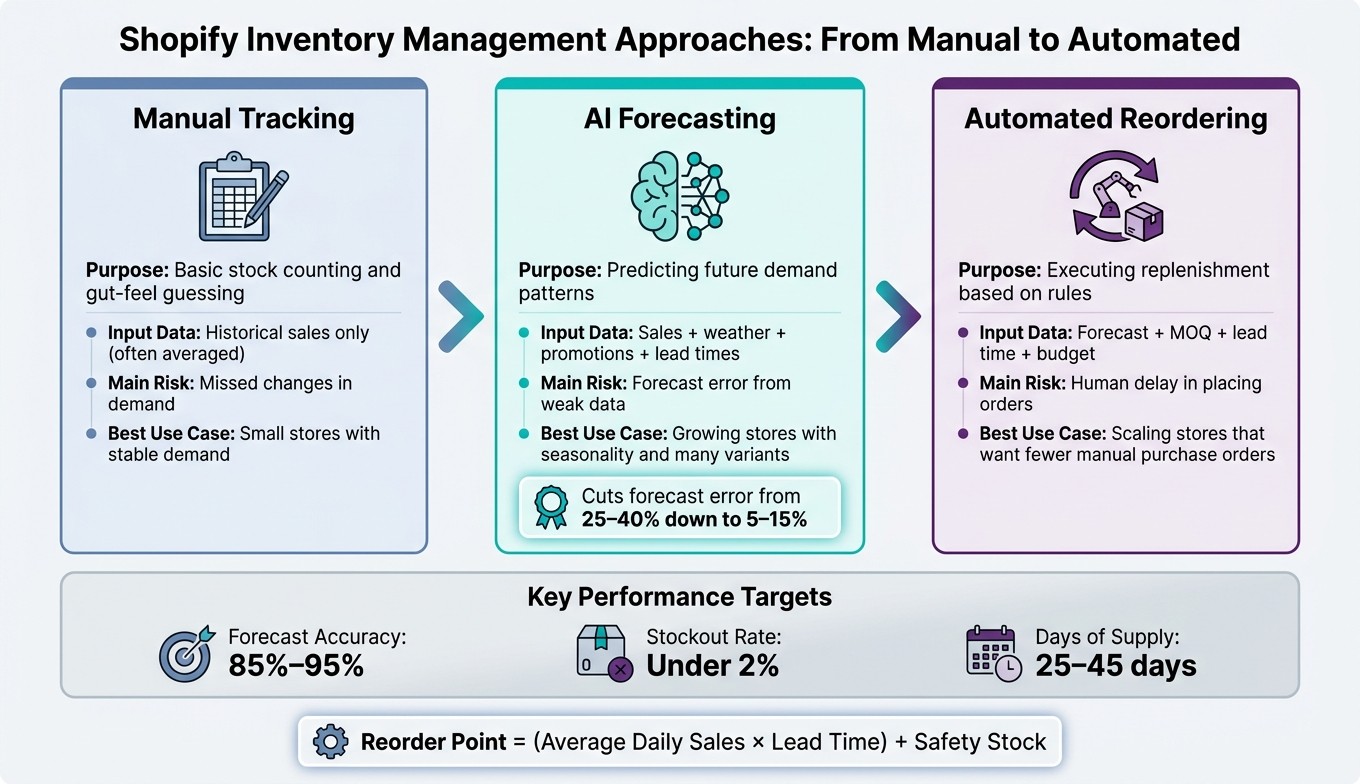
Manual Tracking vs. AI Forecasting vs. Automated Reordering for Shopify
AI turns inventory into a live decision system. It can forecast demand, flag stock risk, and trigger restocking rules before you lose sales. But there’s a catch: this only works if your store data is clean, complete, and structured well enough to support forecasting.
Use Sales Patterns to Forecast Future Demand
Manual forecasting usually looks at one thing: past sales.
AI looks at a lot more. It uses historical sales by SKU and variant, seasonal trends, promo calendars, and outside signals like weather or social media trends. Then it turns that mix into demand estimates at the SKU, variant, or warehouse-location level.
That level of detail matters more than most stores think. A small size in a best-selling shirt might sell out fast, while the large size sits longer. One broad forecast would miss that.
AI can also learn how discounts affect each product. So when you run a promotion, the forecast is based on how shoppers have reacted before, not just a rough spreadsheet rule.
Spot Stock Risks Before They Become Lost Sales
AI watches inventory health all the time, not just when someone logs in and checks it. It tracks how fast each SKU is selling against available stock, based on on-hand units minus units already committed to open orders. Then it flags risk before inventory hits zero.
That’s not the same as a basic low-stock alert.
A simple alert says, “You’re running low.” AI goes further. It can tell the difference between a product with steady sales and one that suddenly took off because of an ad or social post. Real-time stock-health alerts can save planning time and catch overstocks before they turn into write-offs. They also flag slow movers, which gives you time to act before extra inventory starts tying up cash.
Manual Tracking vs. AI Forecasting vs. Automated Reordering
These three approaches do different jobs. They’re not just different versions of the same thing.
Factor | Manual Tracking | AI Forecasting | Automated Reordering |
|---|---|---|---|
Purpose | Basic stock counting and gut-feel guessing | Predicting future demand patterns | Executing replenishment based on rules |
Input Data | Historical sales only (often averaged) | Sales + weather + promotions + lead times | Forecast + MOQ + lead time + budget |
Main Risk | Missed changes in demand | Forecast error from weak data | Human delay in placing orders |
Best Use Case | Small stores with stable demand | Growing stores with seasonality and many variants | Scaling stores that want fewer manual purchase orders |
A lot of stores begin with manual tracking. That’s fine early on. But as SKU counts grow and demand gets harder to read, mistakes add up. AI forecasting cuts forecast error, and automated reordering helps place the buy decision faster.
These gains depend on clean product and sales data, which is the next step.
How to Prepare Your Shopify Inventory Data for AI
AI forecasting only works when the data behind it is clean. If the inputs are messy, the forecast will be messy too. So the first job is simple: give the model solid sales, stock, and supplier data.
The Inventory Data AI Needs from Your Shopify Store
Most AI inventory tools need at least 6–12 months of sales history at the SKU and variant level to produce steady demand forecasts. They also need current stock counts across every location, supplier lead times, returns, adjustments, and promo signals. If you're planning a flash sale, the AI needs that context. Otherwise, it may treat that sales jump like normal demand and skew the forecast.
Data Input Type | Why AI Needs It | Common Error to Fix |
|---|---|---|
Historical Sales | Identifies velocity and trends | Including test or internal orders |
Lead Times | Determines reorder timing | Using promised vs. actual days |
SKUs/Variants | Granular demand planning | Inconsistent naming or duplicates |
Returns/Adjustments | Corrects available stock counts | Batching returns late |
Promo Calendar | Forecasts demand spikes | Forgetting to label flash sales |
When these inputs are clean, the tool can forecast at the SKU level instead of making rough catalog-level guesses.
Clean Up Product and Variant Records Before Forecasting
Messy records are a common reason AI forecasts miss the mark. Duplicate product listings split sales history across separate records, so the tool sees broken-up demand instead of one clear pattern. Missing variant quantities can do the same thing. And if "Track quantity" is turned off for some variants in Shopify Admin, the forecast loses sight of part of your inventory.
The cleanup work isn't hard, but it does take some patience. A few fixes matter most:
Remove test orders and internal purchases that throw off sales history.
Merge duplicate listings for the same product.
Map old SKU codes to current ones so past demand stays tied to the right item.
Use actual past lead times, not best-case estimates, when setting reorder rules.
This is the kind of setup work that pays off later. Clean records make forecasts tighter and reorder rules more dependable. After that, you can move on to connecting your data to a forecasting tool.
A clean store structure also makes AI forecasting much easier to roll out from day one. This is especially true if you use AI-built Shopify stores designed with clean data architecture from the start.
How to Connect an AI Tool and Set Forecasting and Restocking Rules
Sync Your Shopify Data and Turn On Forecast Tracking
Once your inventory data is clean, install the app from the Shopify App Store and approve access to your products, orders, and inventory. After the sync is done, the tool can use your Shopify history to build forecasts. From there, you can set the rules that tell the system when to reorder.
Give it a little time before you judge the output. Plan for a 24–48 hour processing window before the first predictions appear, and wait through at least three reorder cycles before you act on automated suggestions.
Set Lead Times, Safety Stock, and Reorder Points
Three settings drive most restocking decisions, and getting them right makes a big difference.
Lead time is the gap between placing an order and receiving stock. Use your actual past lead times, then add a buffer for shipping delays.
Safety stock is your cushion when demand jumps or shipments run late. A good starting point is 7–14 days of average sales.
Reorder point (ROP) is the line that tells the system it's time to buy more. A basic formula is:
(Average Daily Sales × Lead Time) + Safety Stock
Some tools also use a dynamic reorder point, which shifts as sales speed or supplier reliability changes instead of staying fixed. That tends to work better once you tune the numbers for seasonality and promos.
Adjust for Seasonality, Promotions, and Demand Spikes
After the baseline is in place, adjust it for sales swings. Start with a normal-sales forecast, then layer in expected changes like seasonality and growth. If you skip that step, the AI may treat a one-off spike - like Black Friday or a clearance sale - as a lasting demand shift.
It also helps to separate campaign demand from organic demand. Connect the tool to your marketing channels, such as Klaviyo or Google Ads, so planned campaigns show up before they go live. That way, inventory stays tied to actual demand instead of promo noise.
For fast-moving products, use a 14-day lookback window. For stable sellers, use a 60–90 day window so reorder points stay up to date.
How to Monitor Inventory Signals and Improve Restocking Over Time
Review Stock Alerts, Forecast Accuracy, and Sell-Through Trends
Once your forecast and reorder rules are live, check them every week for drift. Review inventory exceptions weekly, then recalibrate the rules each month.
On a weekly basis, don’t waste time scanning every SKU. Focus on exceptions. Watch for products getting close to stockout, items with sudden demand spikes, and cases where inventory shows zero or less. Those issues often signal a sync delay or a location-level error, and both can throw off your forecasts.
Each month, review forecast accuracy and mean absolute percentage error (MAPE). A good target is 85%–95% forecast accuracy. If you keep landing below that range, the model likely needs better inputs or new assumptions. More time alone won’t solve it. It also helps to track your sell-through rate by SKU and variant. Fast movers may need more safety stock. Slow movers can turn into dead stock and tie up cash.
One metric that matters more than a plain unit count is days of supply. It tells you how many days your current inventory will last based on forecasted sales. If that number falls below your supplier’s lead time, you’re headed for a stockout. Alerts based on days of supply, instead of a fixed unit threshold, stay useful even when sales speed changes.
Keep a close eye on:
Forecast accuracy: 85%–95%
Stockout rate: under 2%
Days of supply: 25–45 days
Update Reorder Rules as Products and Suppliers Change
As sales patterns shift and suppliers change, your reorder rules need to change with them. Otherwise, the settings slowly drift out of sync with the way your business actually runs. A supplier that once delivered in 7 days might now take 12. A product that sold at a steady pace most of the year might surge in Q4. Those shifts don’t fix themselves. You have to update the inputs.
Each quarter, compare your actual supplier lead times with the numbers in your system. Use the real average lead time, not the quoted one. If a supplier keeps showing up late, increase the lead time setting so reorders trigger sooner. For new products, use a similar SKU as your starting point, then reforecast weekly during launch.
Conclusion: Build a Simpler Inventory System with AI
With clean data, realistic lead times, and weekly check-ins, AI can work like a self-correcting inventory system. Review weekly, update monthly, and let AI handle the restocking math.
FAQs
How much data do I need before AI forecasts are reliable?
Most AI forecasting tools need 6 to 12 months of sales history to make solid predictions. Some can still give you usable forecasts with as little as 3 months of data. But in most cases, a longer history helps the system spot demand patterns in your store, including seasonality and the impact of promotions.
If you have less than 12 months of data, it often makes sense to pair AI with judgment-based forecasting. One more thing matters a lot here: your historical data needs to be clean and consistent, or accuracy can slip fast.
What should I do if my Shopify inventory data is messy or incomplete?
Clean up your data before you use AI. Bad inputs lead to bad suggestions. It’s that simple.
Start with a quick data hygiene check. Standardize name variations, archive products that haven’t sold in the last 12 months, and update supplier lead times so they match what has actually happened in past orders.
Then keep an eye on the signals that show whether your inventory data is lining up with reality. That includes:
Return processing times
Stock mismatches
Negative stock events
If those numbers are off, your available inventory data will be off too.
How often should I update reorder points and safety stock?
With modern AI-driven inventory tools for your Shopify dropshipping store, you usually don’t need to update reorder points or safety stock by hand. These systems adjust those thresholds automatically based on real-time sales velocity, supplier lead times, and market trends.
If you handle inventory manually, check supplier lead times at least once a month. Then update your forecasts whenever new sales data comes in to help prevent stockouts.
Related Blog Posts
Bad inventory calls can drain cash fast. In many Shopify stores, spreadsheet forecasts miss demand by 25% to 40%, while AI-based forecasting can cut that error to 5% to 15%.
If I were setting this up, I’d keep the focus on four things:
Clean store data first: sales history, SKU/variant records, stock counts, returns, promo dates, and actual supplier lead times
Better forecasts: AI looks at sales patterns, seasonality, promos, and lead times instead of just past averages
Smarter reordering: set lead time, safety stock, and reorder points with a simple formula
Weekly and monthly reviews: track forecast accuracy, stockout rate, sell-through, and days of supply
Here’s the short version:
AI helps you spot stockouts before they happen
It can also flag slow movers that lock up cash
New stores often get hit hardest because one ad, post, or sale can wipe out stock in hours
Good forecasts depend on at least 6–12 months of clean SKU-level sales data
A common reorder point formula is: (Average Daily Sales × Lead Time) + Safety Stock
Good targets include 85%–95% forecast accuracy, under 2% stockout rate, and 25–45 days of supply
A quick way I’d think about it: manual tracking counts stock, AI forecasting estimates demand, and automated reordering places the buy decision on rules. Put together, they give you a simpler way to keep products in stock without tying up more money than you need to.
Below, I’ll walk through the main ideas in plain English so you can see how the system fits together.
Using AI to Manage Shopify Inventory Faster
What AI Inventory Optimization Does for Shopify Stores
Manual Tracking vs. AI Forecasting vs. Automated Reordering for Shopify
AI turns inventory into a live decision system. It can forecast demand, flag stock risk, and trigger restocking rules before you lose sales. But there’s a catch: this only works if your store data is clean, complete, and structured well enough to support forecasting.
Use Sales Patterns to Forecast Future Demand
Manual forecasting usually looks at one thing: past sales.
AI looks at a lot more. It uses historical sales by SKU and variant, seasonal trends, promo calendars, and outside signals like weather or social media trends. Then it turns that mix into demand estimates at the SKU, variant, or warehouse-location level.
That level of detail matters more than most stores think. A small size in a best-selling shirt might sell out fast, while the large size sits longer. One broad forecast would miss that.
AI can also learn how discounts affect each product. So when you run a promotion, the forecast is based on how shoppers have reacted before, not just a rough spreadsheet rule.
Spot Stock Risks Before They Become Lost Sales
AI watches inventory health all the time, not just when someone logs in and checks it. It tracks how fast each SKU is selling against available stock, based on on-hand units minus units already committed to open orders. Then it flags risk before inventory hits zero.
That’s not the same as a basic low-stock alert.
A simple alert says, “You’re running low.” AI goes further. It can tell the difference between a product with steady sales and one that suddenly took off because of an ad or social post. Real-time stock-health alerts can save planning time and catch overstocks before they turn into write-offs. They also flag slow movers, which gives you time to act before extra inventory starts tying up cash.
Manual Tracking vs. AI Forecasting vs. Automated Reordering
These three approaches do different jobs. They’re not just different versions of the same thing.
Factor | Manual Tracking | AI Forecasting | Automated Reordering |
|---|---|---|---|
Purpose | Basic stock counting and gut-feel guessing | Predicting future demand patterns | Executing replenishment based on rules |
Input Data | Historical sales only (often averaged) | Sales + weather + promotions + lead times | Forecast + MOQ + lead time + budget |
Main Risk | Missed changes in demand | Forecast error from weak data | Human delay in placing orders |
Best Use Case | Small stores with stable demand | Growing stores with seasonality and many variants | Scaling stores that want fewer manual purchase orders |
A lot of stores begin with manual tracking. That’s fine early on. But as SKU counts grow and demand gets harder to read, mistakes add up. AI forecasting cuts forecast error, and automated reordering helps place the buy decision faster.
These gains depend on clean product and sales data, which is the next step.
How to Prepare Your Shopify Inventory Data for AI
AI forecasting only works when the data behind it is clean. If the inputs are messy, the forecast will be messy too. So the first job is simple: give the model solid sales, stock, and supplier data.
The Inventory Data AI Needs from Your Shopify Store
Most AI inventory tools need at least 6–12 months of sales history at the SKU and variant level to produce steady demand forecasts. They also need current stock counts across every location, supplier lead times, returns, adjustments, and promo signals. If you're planning a flash sale, the AI needs that context. Otherwise, it may treat that sales jump like normal demand and skew the forecast.
Data Input Type | Why AI Needs It | Common Error to Fix |
|---|---|---|
Historical Sales | Identifies velocity and trends | Including test or internal orders |
Lead Times | Determines reorder timing | Using promised vs. actual days |
SKUs/Variants | Granular demand planning | Inconsistent naming or duplicates |
Returns/Adjustments | Corrects available stock counts | Batching returns late |
Promo Calendar | Forecasts demand spikes | Forgetting to label flash sales |
When these inputs are clean, the tool can forecast at the SKU level instead of making rough catalog-level guesses.
Clean Up Product and Variant Records Before Forecasting
Messy records are a common reason AI forecasts miss the mark. Duplicate product listings split sales history across separate records, so the tool sees broken-up demand instead of one clear pattern. Missing variant quantities can do the same thing. And if "Track quantity" is turned off for some variants in Shopify Admin, the forecast loses sight of part of your inventory.
The cleanup work isn't hard, but it does take some patience. A few fixes matter most:
Remove test orders and internal purchases that throw off sales history.
Merge duplicate listings for the same product.
Map old SKU codes to current ones so past demand stays tied to the right item.
Use actual past lead times, not best-case estimates, when setting reorder rules.
This is the kind of setup work that pays off later. Clean records make forecasts tighter and reorder rules more dependable. After that, you can move on to connecting your data to a forecasting tool.
A clean store structure also makes AI forecasting much easier to roll out from day one. This is especially true if you use AI-built Shopify stores designed with clean data architecture from the start.
How to Connect an AI Tool and Set Forecasting and Restocking Rules
Sync Your Shopify Data and Turn On Forecast Tracking
Once your inventory data is clean, install the app from the Shopify App Store and approve access to your products, orders, and inventory. After the sync is done, the tool can use your Shopify history to build forecasts. From there, you can set the rules that tell the system when to reorder.
Give it a little time before you judge the output. Plan for a 24–48 hour processing window before the first predictions appear, and wait through at least three reorder cycles before you act on automated suggestions.
Set Lead Times, Safety Stock, and Reorder Points
Three settings drive most restocking decisions, and getting them right makes a big difference.
Lead time is the gap between placing an order and receiving stock. Use your actual past lead times, then add a buffer for shipping delays.
Safety stock is your cushion when demand jumps or shipments run late. A good starting point is 7–14 days of average sales.
Reorder point (ROP) is the line that tells the system it's time to buy more. A basic formula is:
(Average Daily Sales × Lead Time) + Safety Stock
Some tools also use a dynamic reorder point, which shifts as sales speed or supplier reliability changes instead of staying fixed. That tends to work better once you tune the numbers for seasonality and promos.
Adjust for Seasonality, Promotions, and Demand Spikes
After the baseline is in place, adjust it for sales swings. Start with a normal-sales forecast, then layer in expected changes like seasonality and growth. If you skip that step, the AI may treat a one-off spike - like Black Friday or a clearance sale - as a lasting demand shift.
It also helps to separate campaign demand from organic demand. Connect the tool to your marketing channels, such as Klaviyo or Google Ads, so planned campaigns show up before they go live. That way, inventory stays tied to actual demand instead of promo noise.
For fast-moving products, use a 14-day lookback window. For stable sellers, use a 60–90 day window so reorder points stay up to date.
How to Monitor Inventory Signals and Improve Restocking Over Time
Review Stock Alerts, Forecast Accuracy, and Sell-Through Trends
Once your forecast and reorder rules are live, check them every week for drift. Review inventory exceptions weekly, then recalibrate the rules each month.
On a weekly basis, don’t waste time scanning every SKU. Focus on exceptions. Watch for products getting close to stockout, items with sudden demand spikes, and cases where inventory shows zero or less. Those issues often signal a sync delay or a location-level error, and both can throw off your forecasts.
Each month, review forecast accuracy and mean absolute percentage error (MAPE). A good target is 85%–95% forecast accuracy. If you keep landing below that range, the model likely needs better inputs or new assumptions. More time alone won’t solve it. It also helps to track your sell-through rate by SKU and variant. Fast movers may need more safety stock. Slow movers can turn into dead stock and tie up cash.
One metric that matters more than a plain unit count is days of supply. It tells you how many days your current inventory will last based on forecasted sales. If that number falls below your supplier’s lead time, you’re headed for a stockout. Alerts based on days of supply, instead of a fixed unit threshold, stay useful even when sales speed changes.
Keep a close eye on:
Forecast accuracy: 85%–95%
Stockout rate: under 2%
Days of supply: 25–45 days
Update Reorder Rules as Products and Suppliers Change
As sales patterns shift and suppliers change, your reorder rules need to change with them. Otherwise, the settings slowly drift out of sync with the way your business actually runs. A supplier that once delivered in 7 days might now take 12. A product that sold at a steady pace most of the year might surge in Q4. Those shifts don’t fix themselves. You have to update the inputs.
Each quarter, compare your actual supplier lead times with the numbers in your system. Use the real average lead time, not the quoted one. If a supplier keeps showing up late, increase the lead time setting so reorders trigger sooner. For new products, use a similar SKU as your starting point, then reforecast weekly during launch.
Conclusion: Build a Simpler Inventory System with AI
With clean data, realistic lead times, and weekly check-ins, AI can work like a self-correcting inventory system. Review weekly, update monthly, and let AI handle the restocking math.
FAQs
How much data do I need before AI forecasts are reliable?
Most AI forecasting tools need 6 to 12 months of sales history to make solid predictions. Some can still give you usable forecasts with as little as 3 months of data. But in most cases, a longer history helps the system spot demand patterns in your store, including seasonality and the impact of promotions.
If you have less than 12 months of data, it often makes sense to pair AI with judgment-based forecasting. One more thing matters a lot here: your historical data needs to be clean and consistent, or accuracy can slip fast.
What should I do if my Shopify inventory data is messy or incomplete?
Clean up your data before you use AI. Bad inputs lead to bad suggestions. It’s that simple.
Start with a quick data hygiene check. Standardize name variations, archive products that haven’t sold in the last 12 months, and update supplier lead times so they match what has actually happened in past orders.
Then keep an eye on the signals that show whether your inventory data is lining up with reality. That includes:
Return processing times
Stock mismatches
Negative stock events
If those numbers are off, your available inventory data will be off too.
How often should I update reorder points and safety stock?
With modern AI-driven inventory tools for your Shopify dropshipping store, you usually don’t need to update reorder points or safety stock by hand. These systems adjust those thresholds automatically based on real-time sales velocity, supplier lead times, and market trends.
If you handle inventory manually, check supplier lead times at least once a month. Then update your forecasts whenever new sales data comes in to help prevent stockouts.
Related Blog Posts
Get your store!
© 2025 BuildMyStores
© 2025 BuildMyStores