🎉 Start Shopify’s $1 Plan and We’ll pay you up to $3,600 just for starting! 💸 — Limited Time
Get Limited Time Offer 💰
Offer Details — Rewards require completing eligible third-party offers. Reward amounts vary from $30 to $3,600. Terms and eligibility restrictions apply.
🎉 Start Shopify’s $1 Plan and We’ll pay you up to $3,600 just for starting! 💸 — Limited Time
Get Limited Time Offer 💰
Offer Details — Rewards require completing eligible third-party offers. Reward amounts vary from $30 to $3,600. Terms and eligibility restrictions apply.
🎉 Start Shopify’s $1 Plan and We’ll pay you up to $3,600 just for starting! 💸 — Limited Time
Get Limited Time Offer 💰
Offer Details — Rewards require completing eligible third-party offers. Reward amounts vary from $30 to $3,600. Terms and eligibility restrictions apply.
Ecommerce Strategies
How AI Tools Improve Shopify Page Speed
How AI Tools Improve Shopify Page Speed

A slow Shopify store can hurt sales and SEO. If your site takes over 3 seconds to load, you risk losing more than half of your visitors. Plus, Google prioritizes fast-loading pages in search rankings. AI tools solve this by automating speed optimization tasks like compressing images, managing code, and reducing unnecessary scripts - all without requiring technical skills.
Key Benefits of AI Tools for Shopify Speed:

Faster Load Times: AI can improve load speeds by 15–30%.
Better SEO Performance: Optimized Core Web Vitals can boost organic traffic by 10–25%.
Higher Conversions: Faster pages lead to 5–15% more sales.
Common Shopify Speed Issues:
Large images slow down pages.
JavaScript and CSS files block loading.
Third-party apps add unnecessary weight.
Poor server response times delay loading.
AI tools like TinyIMG, Swift, and SEOAnt automatically handle these challenges by compressing images, lazy loading, minifying code, and monitoring performance in real time. To get started, audit your store with Google PageSpeed Insights, install an AI optimization app, and track improvements over time. Faster pages mean more traffic, fewer bounce rates, and higher revenue.
Shopify Speed Optimization: Fix Slow Loading, Improve SEO & Pass Core Web Vitals
What Affects Shopify Page Speed
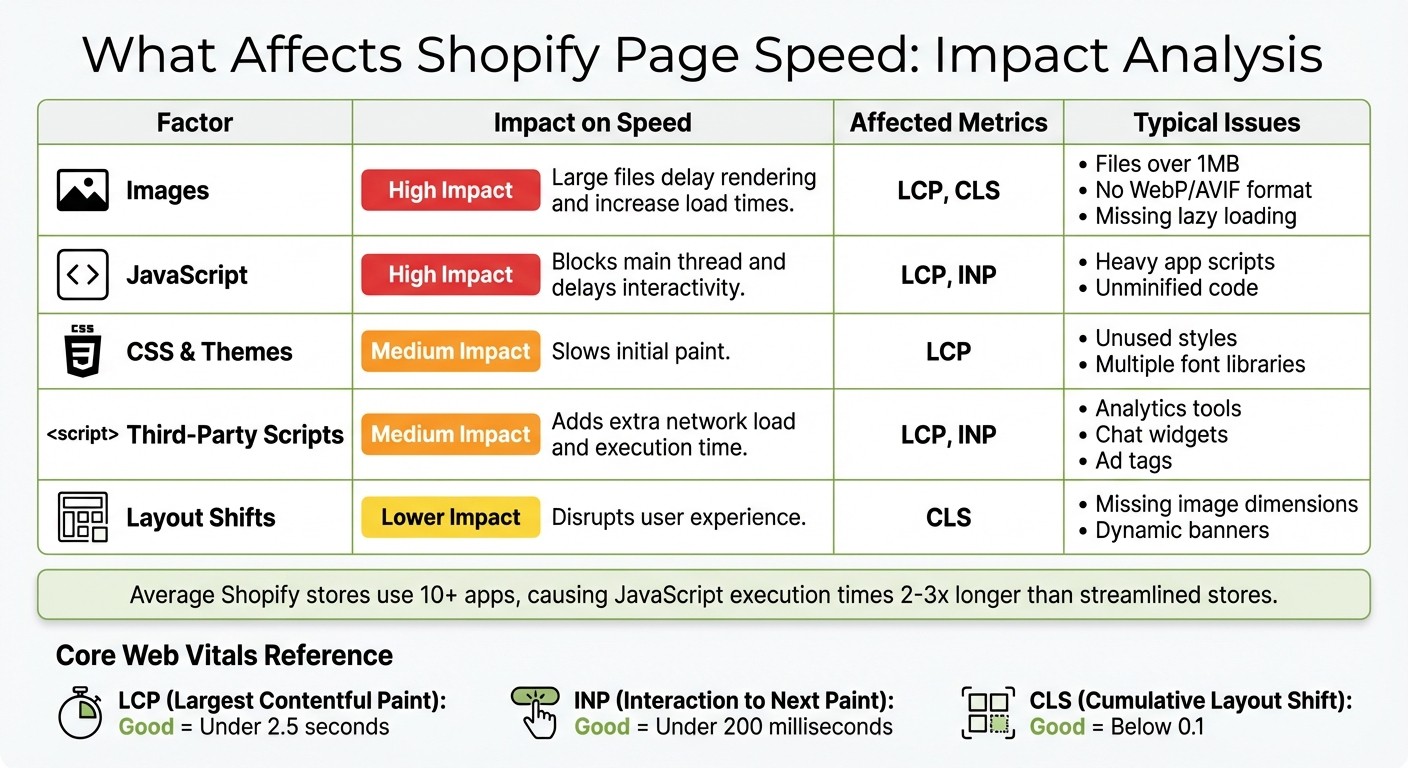
Shopify Speed Factors Impact on Core Web Vitals and Performance
The speed of your Shopify store hinges on several interconnected factors. One of the biggest culprits? Images. Product photos and hero banners often exceed 1MB each, forcing visitors to download hefty files before anything appears on their screens. This issue is even more pronounced for mobile users who end up downloading assets sized for desktops. To address this, switch to next-gen formats like WebP or AVIF and enable lazy loading for images below the fold. These simple steps can significantly improve performance.
Another major factor is JavaScript and CSS files, especially when they're unminified. These files can block your page from loading until they finish processing. On top of that, third-party scripts - from analytics tools, chat widgets, pop-ups, and social media pixels - add more weight. The average Shopify store uses over 10 apps, and each app often injects its own scripts, further inflating JavaScript execution times. Even apps you’ve disabled might still be running scripts behind the scenes.
Server response time also plays a role. Shopify’s hosting is backed by its CDN, but how fast your server responds (measured as Time to First Byte) impacts when assets start downloading. Unoptimized database queries or traffic surges can slow this down, delaying the entire page load.
Core Web Vitals Explained
To truly understand how these factors affect speed, you need to look at Google's Core Web Vitals - three key metrics that influence both search rankings and user experience.
Largest Contentful Paint (LCP) measures how long it takes for the largest visible element - like a hero image or main heading - to fully load. A good LCP score is under 2.5 seconds, but many Shopify stores exceed 4 seconds, leading to higher bounce rates as visitors leave before seeing your products.
Interaction to Next Paint (INP), which replaced First Input Delay (FID), tracks the longest delay between a user action (like clicking a button) and the visual response. Scores under 200 milliseconds are ideal. Heavy, unoptimized JavaScript often pushes INP higher, making your site feel slow and unresponsive.
Cumulative Layout Shift (CLS) measures unexpected movements of content during loading. For instance, if images load without defined dimensions or banners suddenly appear, it can cause layout shifts. A good CLS score is below 0.1, but many Shopify stores score above 0.2 due to shifting banners and dynamic ads, leading to user frustration.
Common Shopify Performance Problems
Shopify themes and apps often introduce performance bottlenecks. JavaScript and CSS are frequent offenders, especially when themes include multiple font libraries, unused styles, or bulky frameworks. Apps like analytics trackers or A/B testing tools add to the problem by injecting synchronous scripts. Research shows that stores with over 10 apps often experience JavaScript execution times 2–3x longer than streamlined stores. Even the theme itself can slow things down - custom sliders and animations, while visually appealing, can drag down performance.
Factor | Impact on Speed | Affected Metrics | Typical Issues |
|---|---|---|---|
Images | Large files delay rendering and increase load times | LCP, CLS | Files over 1MB, no WebP/AVIF, missing lazy loading |
JavaScript | Blocks main thread and delays interactivity | LCP, INP | Heavy app scripts, unminified code |
CSS & Themes | Slows initial paint | LCP | Unused styles, multiple font libraries |
Third-Party Scripts | Adds extra network load and execution time | LCP, INP | Analytics, chat widgets, ad tags |
Layout Shifts | Disrupts user experience | CLS | Missing image dimensions, dynamic banners |
These challenges highlight the need for targeted optimizations, which will be explored in the next sections. By addressing these issues, you can ensure your Shopify store runs faster and delivers a smoother experience for your customers.
How AI Tools Optimize Shopify Page Speed
AI tools have revolutionized Shopify speed optimization by automating tasks that once required constant manual effort. These tools dive into your store's assets, theme code, and traffic patterns to implement targeted fixes - compressing images, minifying code, managing scripts, and even predicting which pages visitors might view next. And the best part? You don’t need to touch a single line of code. These fixes directly improve key metrics like LCP (Largest Contentful Paint), INP (Interaction to Next Paint), and CLS (Cumulative Layout Shift), leading to faster load times, better Core Web Vitals scores, and a smoother shopping experience across all devices. Let’s break down how AI tackles image optimization, code management, and real-time performance monitoring to boost your store’s speed.
AI-Powered Image Optimization
AI tools take the heavy lifting out of image optimization by scanning your product photos and banners, then applying perceptual compression to remove unnecessary data that users can’t see. This process dramatically reduces file sizes - up to 94% for PNG files and 54% for JPG files - without sacrificing visual quality. Tools like TinyIMG use machine learning to determine the best compression level for each image and convert them into next-gen formats like WebP or AVIF, which load faster than traditional formats like JPEG or PNG.
AI doesn’t stop at compression. It ensures responsive image delivery by serving different resolutions depending on whether a visitor is browsing on a smartphone, tablet, or desktop. This prevents mobile users in the U.S. from downloading oversized assets on cellular networks. Additionally, AI introduces responsive lazy loading, which delays loading offscreen images - such as product gallery shots - until they’re actually needed. This approach reduces the initial page load weight and can improve LCP by up to 0.7 seconds or more.
Automated Code and Script Management
AI tools also streamline your store’s backend by optimizing code. They minify CSS, JavaScript, and HTML, removing unnecessary characters and whitespace to shrink file sizes. Non-critical scripts, such as chat widgets or tracking pixels, are deferred to prevent them from slowing down the initial load.
Advanced AI systems take it a step further with conditional loading, which ensures that third-party apps only load on relevant pages. For instance, a review widget might appear solely on product pages, while a social media feed is reserved for the homepage. This selective loading reduces JavaScript execution time and improves INP, ensuring your store remains highly responsive. Tools like Thunder Page Speed Optimizer and Swift offer one-click solutions that handle minification, script deferral, and preloading - no coding required.
Continuous Performance Monitoring
AI doesn’t just optimize once and call it a day - it continuously monitors your store’s performance in real time. By tracking Core Web Vitals, load times, and resource usage, these tools establish a baseline and use machine learning to identify anomalies or slowdowns caused by new app installations, theme updates, or traffic spikes. When issues arise, AI automatically adjusts settings, updates lazy loading thresholds, tweaks preloading priorities, or flags problematic scripts.
Some tools go even further by using predictive analytics to anticipate user behavior. For example, they analyze browsing patterns to predict which page a visitor will navigate to next and preload it in the background. This Navigation AI, paired with adaptive caching strategies that adjust to traffic surges, keeps your store running smoothly - even during high-demand periods like Black Friday or holiday sales. For U.S. merchants, this means maintaining peak performance without needing a developer’s help.
Benefits of Using AI Tools for Page Speed
AI tools bring three major advantages: faster load times, better SEO performance, and higher conversion rates. The best part? You don’t need coding skills or a dedicated developer - these tools automate everything, making advanced optimization accessible to any Shopify store in the U.S. By applying these tools, you can turn quick fixes into measurable business growth. Together, these benefits create a smooth shopping experience that boosts both traffic and sales.
Faster Load Times and Better User Experience
Speed matters. Faster load times keep shoppers engaged and reduce bounce rates. Tests reveal a 0.7-second improvement in Largest Contentful Paint (LCP) and up to a 20-point performance boost, which can lower bounce rates by as much as 40%. For mobile users, features like predictive preloading and lazy loading ensure product pages load almost instantly. This seamless experience - from the homepage to checkout - encourages shoppers to stay longer, explore more products, and interact more with your store.
Improved SEO Rankings
AI tools can also give your SEO a boost. By optimizing metrics like Core Web Vitals (LCP, INP, and CLS), these tools improve your store’s ranking on Google. Features like image compression and code minification can increase your organic search visibility by 10–25%, without requiring you to become an SEO expert. For instance, SEOAnt testing showed a 23-point performance score increase, helping stores climb Google’s rankings. When your Shopify store outpaces competitors in loading speed, Google rewards you with better visibility, attracting more U.S. shoppers to your site.
Higher Conversion Rates
Speed directly impacts sales. Businesses using AI-powered optimization report 5–15% higher conversion rates alongside better performance. When pages load 15–30% faster, shoppers experience fewer delays, making navigation from product view to checkout much smoother. Features like automated preloading and lazy loading remove barriers, translating to measurable sales growth. For U.S. store owners, these improvements mean more revenue without needing to adjust products, pricing, or marketing.
Platforms like BuildMyStores incorporate these AI-driven optimizations into their free, customizable Shopify dropshipping stores, ensuring fast load times and a user-friendly experience right from the start.
How to Implement AI Tools for Page Speed
Setting up AI tools to improve page speed is simpler than you might think - no coding skills required. The process involves three key steps: assessing your current performance, selecting and configuring the right tools, and tracking your progress over time. Many Shopify merchants notice faster load times within days, but the real secret lies in starting with accurate data and choosing tools tailored to your store's specific needs.
Audit Your Current Store Performance
Before diving into AI tools, it's crucial to understand your store's current performance. Use Google PageSpeed Insights to test your homepage, a popular product page, and a collection page. Focus on metrics like Largest Contentful Paint (LCP), Interaction to Next Paint (INP), Cumulative Layout Shift (CLS), overall performance score, total page size, and the number of requests. Save these results for comparison.
Next, test these same pages on a smartphone using a standard 4G connection. Time how long it takes for the page to feel usable - your goal should be under 2–3 seconds for key pages. Identify any large images, unminified code, redundant apps, or third-party widgets flagged as performance issues. These are the areas AI tools will target first, setting the stage for optimization.
Install and Configure AI Tools
Once you've identified performance bottlenecks, head to the Shopify App Store through your Shopify admin. Search for tools like "AI speed optimizer" or "AI image optimization", or explore specific apps such as TinyIMG, Swift, Tapita, Thunder, or SEOAnt. Filter by ratings and reviews, and look for features such as:
One-click speed optimization
Automatic image compression and WebP conversion
Lazy loading for images and videos
JavaScript and CSS minification
Predictive preloading for faster navigation
Regular performance audits
Start by installing your chosen app and activating its basic settings on a non-essential page. Re-test that page using Google PageSpeed Insights and real devices to ensure everything works smoothly. Once you're confident, apply these optimizations store-wide. Enable features like AI-powered image optimization (automatic compression, responsive delivery), lazy loading for below-the-fold content, and script deferral for JavaScript and CSS. Many apps also offer an "auto-boost" option, which bundles these optimizations for maximum impact. If available, turn on predictive preloading to make browsing feel seamless, especially for mobile users.
For an even faster start, consider using services like BuildMyStores, which provide pre-built Shopify dropshipping stores optimized for speed. These stores come with a clean, fast foundation that you can further enhance with AI tools.
Monitor and Adjust Over Time
After setting up your AI tools, ongoing monitoring is crucial to maintaining and improving performance. Use Google PageSpeed Insights to regularly track metrics like LCP, INP, CLS, and overall performance scores. Aim for an LCP under 2.5 seconds and a CLS below 0.1 across your main templates. Beyond technical metrics, keep an eye on business indicators like bounce rate, pages per session, and conversion rate. Many merchants report faster load times (15–30%), lower bounce rates (20–40%), and higher conversions (5–15%) after implementing AI optimizations.
Set your AI tools to automatically optimize new content and assets. Check their dashboards regularly to ensure features like image compression and lazy loading remain effective. Perform a full audit monthly or after significant changes, such as app updates, theme adjustments, or major campaigns. If you notice slower performance - like increased page size or a higher LCP - adjust your settings. This might involve compressing images more aggressively, deferring scripts on non-critical apps, or removing unnecessary widgets. By repeating this cycle, you'll keep your store running at peak performance.
Conclusion
Let’s take a look at how AI is reshaping performance optimization and helping Shopify merchants achieve measurable results.
AI-driven tools are revolutionizing the way merchants tackle performance challenges. Forget the hassle of manually compressing images or tweaking code - AI tools are stepping in to deliver impressive results like 15–30% faster load times, 20–40% lower bounce rates, and even 5–15% higher conversion rates.
Apps like TinyIMG and SEOAnt stand out by automating key optimizations as your store grows. They take care of tasks like image compression, lazy loading, and code minification with minimal effort on your part. A great starting point? Use Google PageSpeed Insights to identify bottlenecks, then choose an AI tool that fits your needs. Many of these apps offer simple one-click setups and even free plans, making them accessible for store owners without technical expertise.
The beauty of modern AI tools is their ability to adapt. As your store evolves, these tools can adjust features like predictive preloading and script management to ensure your site continues to perform at its best. This isn’t just a one-time fix - it’s a long-term strategy for maintaining peak performance.
For U.S. merchants operating in competitive markets, even small improvements in speed can lead to noticeable revenue growth. Whether you’re starting fresh or working with pre-optimized platforms like BuildMyStores, combining a solid foundation with advanced AI tools ensures a smooth shopping experience that keeps customers coming back.
Ready to get started? Run a speed audit today to pinpoint performance issues, choose the right AI app, and monitor the results. With the right tools in place, you’ll see the difference not just in speed, but in your bottom line.
FAQs
How can AI tools help speed up your Shopify store without needing technical skills?
AI tools make it easier than ever to speed up your Shopify store. These tools automatically analyze your store's performance and fine-tune critical elements, such as page load times and design features, to ensure everything runs smoothly. The best part? You don’t need any coding skills to make it happen.
By taking care of the heavy lifting behind the scenes, these tools allow you to create a faster, more seamless shopping experience for your customers. This not only enhances user satisfaction but also helps drive higher conversion rates with minimal effort.
How can AI tools help improve the loading speed of a Shopify store?
AI tools can play a big role in speeding up your Shopify store by analyzing performance data and pinpointing areas that need improvement. They can handle tasks like compressing images, cleaning up your code, and removing unnecessary elements - all of which help your pages load faster.
Using AI, you can keep your store running smoothly, which not only enhances the shopping experience for your customers but could also lead to increased sales. For example, platforms such as BuildMyStores offer Shopify stores built with AI, ensuring they’re optimized and ready to deliver top performance from day one.
How do AI tools improve SEO and boost conversion rates for Shopify stores?
AI tools play a key role in boosting SEO and driving higher conversion rates for Shopify stores by improving page load speeds. Since search engines prioritize faster-loading pages, this directly enhances a store's visibility. Plus, quicker load times make browsing more enjoyable for users, increasing the chances they'll stick around and make a purchase.
On top of that, AI-driven solutions can analyze how users interact with your site and adjust performance in real time. This means store owners can attract more visitors and turn casual browsers into repeat customers with better site functionality and user experience.
Related Blog Posts
A slow Shopify store can hurt sales and SEO. If your site takes over 3 seconds to load, you risk losing more than half of your visitors. Plus, Google prioritizes fast-loading pages in search rankings. AI tools solve this by automating speed optimization tasks like compressing images, managing code, and reducing unnecessary scripts - all without requiring technical skills.
Key Benefits of AI Tools for Shopify Speed:
Faster Load Times: AI can improve load speeds by 15–30%.
Better SEO Performance: Optimized Core Web Vitals can boost organic traffic by 10–25%.
Higher Conversions: Faster pages lead to 5–15% more sales.
Common Shopify Speed Issues:
Large images slow down pages.
JavaScript and CSS files block loading.
Third-party apps add unnecessary weight.
Poor server response times delay loading.
AI tools like TinyIMG, Swift, and SEOAnt automatically handle these challenges by compressing images, lazy loading, minifying code, and monitoring performance in real time. To get started, audit your store with Google PageSpeed Insights, install an AI optimization app, and track improvements over time. Faster pages mean more traffic, fewer bounce rates, and higher revenue.
Shopify Speed Optimization: Fix Slow Loading, Improve SEO & Pass Core Web Vitals
What Affects Shopify Page Speed
Shopify Speed Factors Impact on Core Web Vitals and Performance
The speed of your Shopify store hinges on several interconnected factors. One of the biggest culprits? Images. Product photos and hero banners often exceed 1MB each, forcing visitors to download hefty files before anything appears on their screens. This issue is even more pronounced for mobile users who end up downloading assets sized for desktops. To address this, switch to next-gen formats like WebP or AVIF and enable lazy loading for images below the fold. These simple steps can significantly improve performance.
Another major factor is JavaScript and CSS files, especially when they're unminified. These files can block your page from loading until they finish processing. On top of that, third-party scripts - from analytics tools, chat widgets, pop-ups, and social media pixels - add more weight. The average Shopify store uses over 10 apps, and each app often injects its own scripts, further inflating JavaScript execution times. Even apps you’ve disabled might still be running scripts behind the scenes.
Server response time also plays a role. Shopify’s hosting is backed by its CDN, but how fast your server responds (measured as Time to First Byte) impacts when assets start downloading. Unoptimized database queries or traffic surges can slow this down, delaying the entire page load.
Core Web Vitals Explained
To truly understand how these factors affect speed, you need to look at Google's Core Web Vitals - three key metrics that influence both search rankings and user experience.
Largest Contentful Paint (LCP) measures how long it takes for the largest visible element - like a hero image or main heading - to fully load. A good LCP score is under 2.5 seconds, but many Shopify stores exceed 4 seconds, leading to higher bounce rates as visitors leave before seeing your products.
Interaction to Next Paint (INP), which replaced First Input Delay (FID), tracks the longest delay between a user action (like clicking a button) and the visual response. Scores under 200 milliseconds are ideal. Heavy, unoptimized JavaScript often pushes INP higher, making your site feel slow and unresponsive.
Cumulative Layout Shift (CLS) measures unexpected movements of content during loading. For instance, if images load without defined dimensions or banners suddenly appear, it can cause layout shifts. A good CLS score is below 0.1, but many Shopify stores score above 0.2 due to shifting banners and dynamic ads, leading to user frustration.
Common Shopify Performance Problems
Shopify themes and apps often introduce performance bottlenecks. JavaScript and CSS are frequent offenders, especially when themes include multiple font libraries, unused styles, or bulky frameworks. Apps like analytics trackers or A/B testing tools add to the problem by injecting synchronous scripts. Research shows that stores with over 10 apps often experience JavaScript execution times 2–3x longer than streamlined stores. Even the theme itself can slow things down - custom sliders and animations, while visually appealing, can drag down performance.
Factor | Impact on Speed | Affected Metrics | Typical Issues |
|---|---|---|---|
Images | Large files delay rendering and increase load times | LCP, CLS | Files over 1MB, no WebP/AVIF, missing lazy loading |
JavaScript | Blocks main thread and delays interactivity | LCP, INP | Heavy app scripts, unminified code |
CSS & Themes | Slows initial paint | LCP | Unused styles, multiple font libraries |
Third-Party Scripts | Adds extra network load and execution time | LCP, INP | Analytics, chat widgets, ad tags |
Layout Shifts | Disrupts user experience | CLS | Missing image dimensions, dynamic banners |
These challenges highlight the need for targeted optimizations, which will be explored in the next sections. By addressing these issues, you can ensure your Shopify store runs faster and delivers a smoother experience for your customers.
How AI Tools Optimize Shopify Page Speed
AI tools have revolutionized Shopify speed optimization by automating tasks that once required constant manual effort. These tools dive into your store's assets, theme code, and traffic patterns to implement targeted fixes - compressing images, minifying code, managing scripts, and even predicting which pages visitors might view next. And the best part? You don’t need to touch a single line of code. These fixes directly improve key metrics like LCP (Largest Contentful Paint), INP (Interaction to Next Paint), and CLS (Cumulative Layout Shift), leading to faster load times, better Core Web Vitals scores, and a smoother shopping experience across all devices. Let’s break down how AI tackles image optimization, code management, and real-time performance monitoring to boost your store’s speed.
AI-Powered Image Optimization
AI tools take the heavy lifting out of image optimization by scanning your product photos and banners, then applying perceptual compression to remove unnecessary data that users can’t see. This process dramatically reduces file sizes - up to 94% for PNG files and 54% for JPG files - without sacrificing visual quality. Tools like TinyIMG use machine learning to determine the best compression level for each image and convert them into next-gen formats like WebP or AVIF, which load faster than traditional formats like JPEG or PNG.
AI doesn’t stop at compression. It ensures responsive image delivery by serving different resolutions depending on whether a visitor is browsing on a smartphone, tablet, or desktop. This prevents mobile users in the U.S. from downloading oversized assets on cellular networks. Additionally, AI introduces responsive lazy loading, which delays loading offscreen images - such as product gallery shots - until they’re actually needed. This approach reduces the initial page load weight and can improve LCP by up to 0.7 seconds or more.
Automated Code and Script Management
AI tools also streamline your store’s backend by optimizing code. They minify CSS, JavaScript, and HTML, removing unnecessary characters and whitespace to shrink file sizes. Non-critical scripts, such as chat widgets or tracking pixels, are deferred to prevent them from slowing down the initial load.
Advanced AI systems take it a step further with conditional loading, which ensures that third-party apps only load on relevant pages. For instance, a review widget might appear solely on product pages, while a social media feed is reserved for the homepage. This selective loading reduces JavaScript execution time and improves INP, ensuring your store remains highly responsive. Tools like Thunder Page Speed Optimizer and Swift offer one-click solutions that handle minification, script deferral, and preloading - no coding required.
Continuous Performance Monitoring
AI doesn’t just optimize once and call it a day - it continuously monitors your store’s performance in real time. By tracking Core Web Vitals, load times, and resource usage, these tools establish a baseline and use machine learning to identify anomalies or slowdowns caused by new app installations, theme updates, or traffic spikes. When issues arise, AI automatically adjusts settings, updates lazy loading thresholds, tweaks preloading priorities, or flags problematic scripts.
Some tools go even further by using predictive analytics to anticipate user behavior. For example, they analyze browsing patterns to predict which page a visitor will navigate to next and preload it in the background. This Navigation AI, paired with adaptive caching strategies that adjust to traffic surges, keeps your store running smoothly - even during high-demand periods like Black Friday or holiday sales. For U.S. merchants, this means maintaining peak performance without needing a developer’s help.
Benefits of Using AI Tools for Page Speed
AI tools bring three major advantages: faster load times, better SEO performance, and higher conversion rates. The best part? You don’t need coding skills or a dedicated developer - these tools automate everything, making advanced optimization accessible to any Shopify store in the U.S. By applying these tools, you can turn quick fixes into measurable business growth. Together, these benefits create a smooth shopping experience that boosts both traffic and sales.
Faster Load Times and Better User Experience
Speed matters. Faster load times keep shoppers engaged and reduce bounce rates. Tests reveal a 0.7-second improvement in Largest Contentful Paint (LCP) and up to a 20-point performance boost, which can lower bounce rates by as much as 40%. For mobile users, features like predictive preloading and lazy loading ensure product pages load almost instantly. This seamless experience - from the homepage to checkout - encourages shoppers to stay longer, explore more products, and interact more with your store.
Improved SEO Rankings
AI tools can also give your SEO a boost. By optimizing metrics like Core Web Vitals (LCP, INP, and CLS), these tools improve your store’s ranking on Google. Features like image compression and code minification can increase your organic search visibility by 10–25%, without requiring you to become an SEO expert. For instance, SEOAnt testing showed a 23-point performance score increase, helping stores climb Google’s rankings. When your Shopify store outpaces competitors in loading speed, Google rewards you with better visibility, attracting more U.S. shoppers to your site.
Higher Conversion Rates
Speed directly impacts sales. Businesses using AI-powered optimization report 5–15% higher conversion rates alongside better performance. When pages load 15–30% faster, shoppers experience fewer delays, making navigation from product view to checkout much smoother. Features like automated preloading and lazy loading remove barriers, translating to measurable sales growth. For U.S. store owners, these improvements mean more revenue without needing to adjust products, pricing, or marketing.
Platforms like BuildMyStores incorporate these AI-driven optimizations into their free, customizable Shopify dropshipping stores, ensuring fast load times and a user-friendly experience right from the start.
How to Implement AI Tools for Page Speed
Setting up AI tools to improve page speed is simpler than you might think - no coding skills required. The process involves three key steps: assessing your current performance, selecting and configuring the right tools, and tracking your progress over time. Many Shopify merchants notice faster load times within days, but the real secret lies in starting with accurate data and choosing tools tailored to your store's specific needs.
Audit Your Current Store Performance
Before diving into AI tools, it's crucial to understand your store's current performance. Use Google PageSpeed Insights to test your homepage, a popular product page, and a collection page. Focus on metrics like Largest Contentful Paint (LCP), Interaction to Next Paint (INP), Cumulative Layout Shift (CLS), overall performance score, total page size, and the number of requests. Save these results for comparison.
Next, test these same pages on a smartphone using a standard 4G connection. Time how long it takes for the page to feel usable - your goal should be under 2–3 seconds for key pages. Identify any large images, unminified code, redundant apps, or third-party widgets flagged as performance issues. These are the areas AI tools will target first, setting the stage for optimization.
Install and Configure AI Tools
Once you've identified performance bottlenecks, head to the Shopify App Store through your Shopify admin. Search for tools like "AI speed optimizer" or "AI image optimization", or explore specific apps such as TinyIMG, Swift, Tapita, Thunder, or SEOAnt. Filter by ratings and reviews, and look for features such as:
One-click speed optimization
Automatic image compression and WebP conversion
Lazy loading for images and videos
JavaScript and CSS minification
Predictive preloading for faster navigation
Regular performance audits
Start by installing your chosen app and activating its basic settings on a non-essential page. Re-test that page using Google PageSpeed Insights and real devices to ensure everything works smoothly. Once you're confident, apply these optimizations store-wide. Enable features like AI-powered image optimization (automatic compression, responsive delivery), lazy loading for below-the-fold content, and script deferral for JavaScript and CSS. Many apps also offer an "auto-boost" option, which bundles these optimizations for maximum impact. If available, turn on predictive preloading to make browsing feel seamless, especially for mobile users.
For an even faster start, consider using services like BuildMyStores, which provide pre-built Shopify dropshipping stores optimized for speed. These stores come with a clean, fast foundation that you can further enhance with AI tools.
Monitor and Adjust Over Time
After setting up your AI tools, ongoing monitoring is crucial to maintaining and improving performance. Use Google PageSpeed Insights to regularly track metrics like LCP, INP, CLS, and overall performance scores. Aim for an LCP under 2.5 seconds and a CLS below 0.1 across your main templates. Beyond technical metrics, keep an eye on business indicators like bounce rate, pages per session, and conversion rate. Many merchants report faster load times (15–30%), lower bounce rates (20–40%), and higher conversions (5–15%) after implementing AI optimizations.
Set your AI tools to automatically optimize new content and assets. Check their dashboards regularly to ensure features like image compression and lazy loading remain effective. Perform a full audit monthly or after significant changes, such as app updates, theme adjustments, or major campaigns. If you notice slower performance - like increased page size or a higher LCP - adjust your settings. This might involve compressing images more aggressively, deferring scripts on non-critical apps, or removing unnecessary widgets. By repeating this cycle, you'll keep your store running at peak performance.
Conclusion
Let’s take a look at how AI is reshaping performance optimization and helping Shopify merchants achieve measurable results.
AI-driven tools are revolutionizing the way merchants tackle performance challenges. Forget the hassle of manually compressing images or tweaking code - AI tools are stepping in to deliver impressive results like 15–30% faster load times, 20–40% lower bounce rates, and even 5–15% higher conversion rates.
Apps like TinyIMG and SEOAnt stand out by automating key optimizations as your store grows. They take care of tasks like image compression, lazy loading, and code minification with minimal effort on your part. A great starting point? Use Google PageSpeed Insights to identify bottlenecks, then choose an AI tool that fits your needs. Many of these apps offer simple one-click setups and even free plans, making them accessible for store owners without technical expertise.
The beauty of modern AI tools is their ability to adapt. As your store evolves, these tools can adjust features like predictive preloading and script management to ensure your site continues to perform at its best. This isn’t just a one-time fix - it’s a long-term strategy for maintaining peak performance.
For U.S. merchants operating in competitive markets, even small improvements in speed can lead to noticeable revenue growth. Whether you’re starting fresh or working with pre-optimized platforms like BuildMyStores, combining a solid foundation with advanced AI tools ensures a smooth shopping experience that keeps customers coming back.
Ready to get started? Run a speed audit today to pinpoint performance issues, choose the right AI app, and monitor the results. With the right tools in place, you’ll see the difference not just in speed, but in your bottom line.
FAQs
How can AI tools help speed up your Shopify store without needing technical skills?
AI tools make it easier than ever to speed up your Shopify store. These tools automatically analyze your store's performance and fine-tune critical elements, such as page load times and design features, to ensure everything runs smoothly. The best part? You don’t need any coding skills to make it happen.
By taking care of the heavy lifting behind the scenes, these tools allow you to create a faster, more seamless shopping experience for your customers. This not only enhances user satisfaction but also helps drive higher conversion rates with minimal effort.
How can AI tools help improve the loading speed of a Shopify store?
AI tools can play a big role in speeding up your Shopify store by analyzing performance data and pinpointing areas that need improvement. They can handle tasks like compressing images, cleaning up your code, and removing unnecessary elements - all of which help your pages load faster.
Using AI, you can keep your store running smoothly, which not only enhances the shopping experience for your customers but could also lead to increased sales. For example, platforms such as BuildMyStores offer Shopify stores built with AI, ensuring they’re optimized and ready to deliver top performance from day one.
How do AI tools improve SEO and boost conversion rates for Shopify stores?
AI tools play a key role in boosting SEO and driving higher conversion rates for Shopify stores by improving page load speeds. Since search engines prioritize faster-loading pages, this directly enhances a store's visibility. Plus, quicker load times make browsing more enjoyable for users, increasing the chances they'll stick around and make a purchase.
On top of that, AI-driven solutions can analyze how users interact with your site and adjust performance in real time. This means store owners can attract more visitors and turn casual browsers into repeat customers with better site functionality and user experience.
Related Blog Posts
Get your store!
© 2025 BuildMyStores
© 2025 BuildMyStores